Reliable Data Ingestion to OneLake: Challenges, Patterns, and Mitigations
A practical guide to handling late arrivals, petabyte-scale loads, CDC, rate limits, schema evolution, multicloud access, and complex downstream processing in Microsoft Fabric—plus where Databricks, Dremio, and Starburst fit.
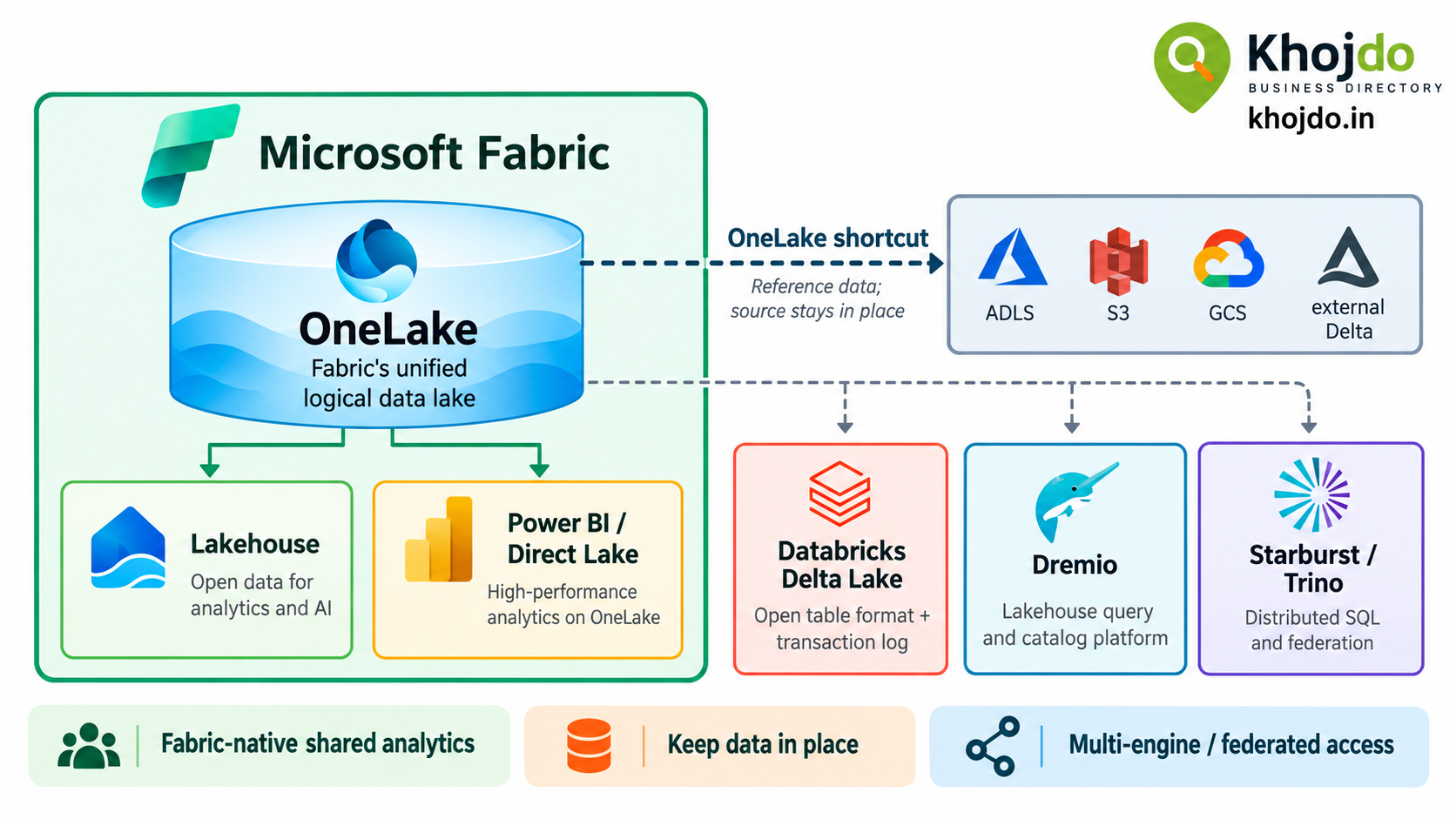
Microsoft Fabric is the official product name. OneLake is its shared logical data lake; it provides a common place for Fabric workloads to access analytics data. A OneLake shortcut is a reference to data in another supported location, so Fabric can access it without first copying it into the destination item.
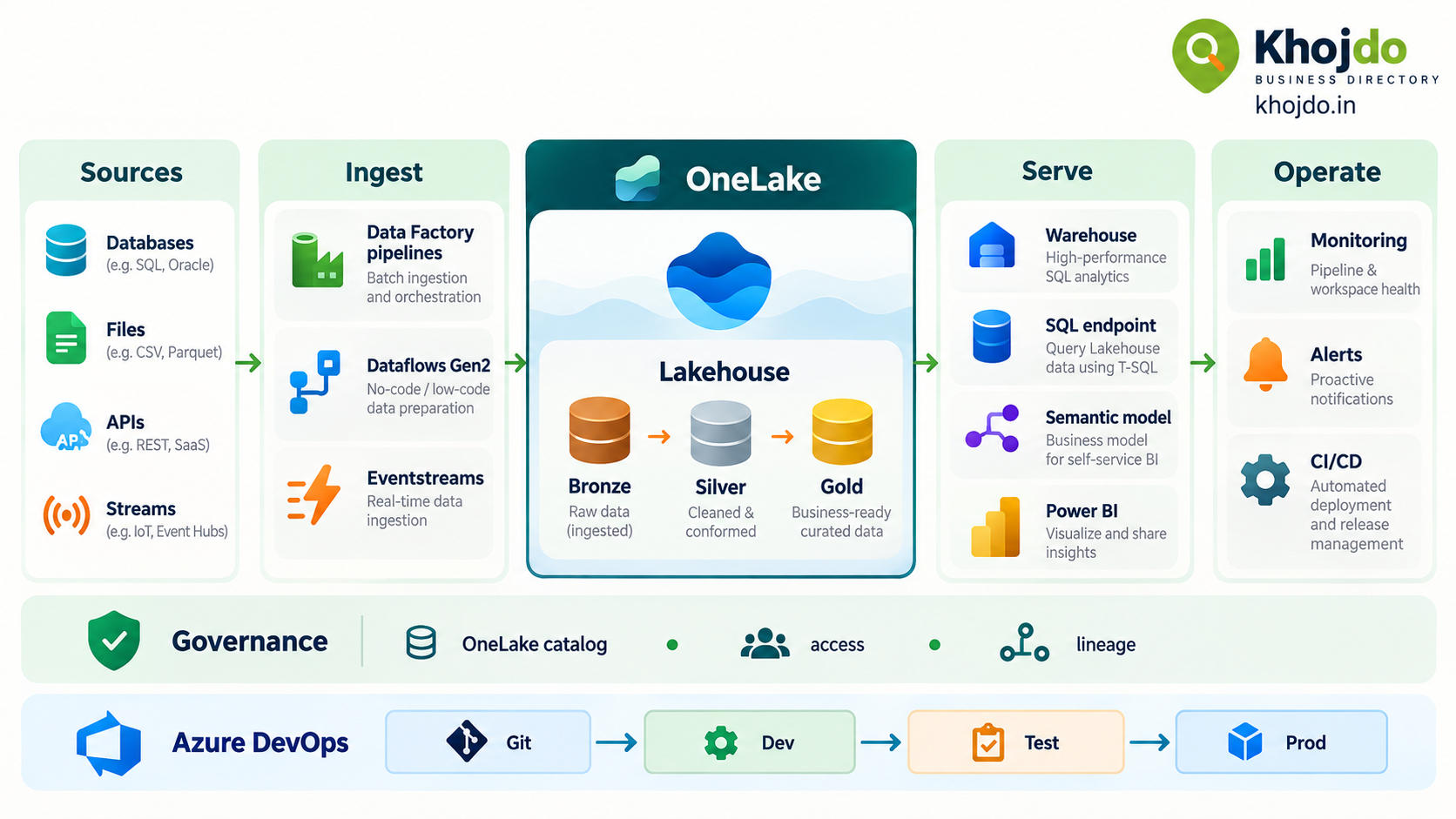
OneLake is the storage foundation, not the ingestion engine. Data Factory, Copy jobs, Mirroring, Eventstreams, notebooks, and other tools handle different ingestion and processing patterns. A good design chooses among them based on source capabilities, freshness needs, volume, permissions, and recovery requirements. A shortcut can avoid an initial copy, but it does not remove the source’s latency, availability, or access dependencies.
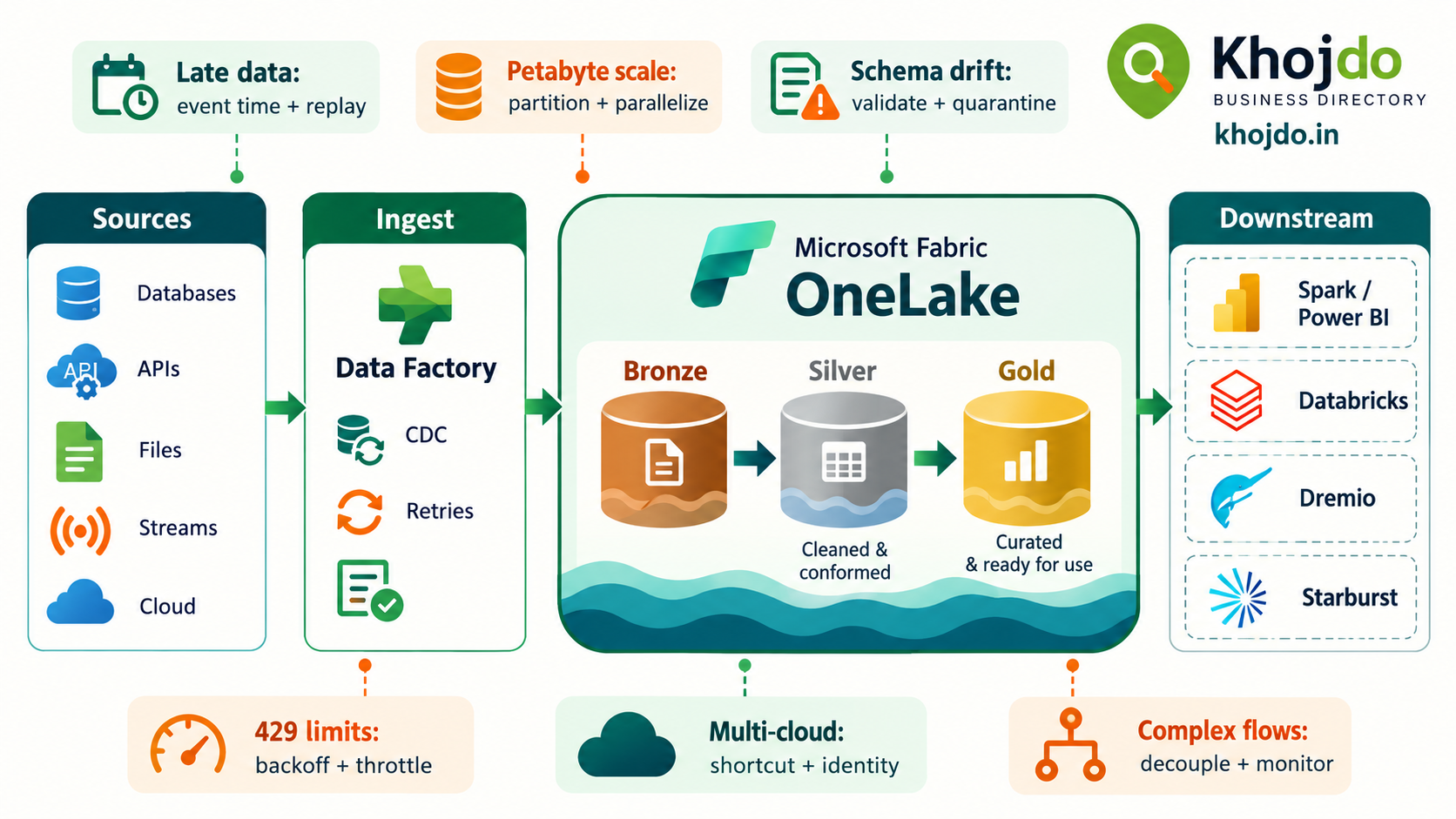
Key ingestion challenges and practical patterns
| Challenge and example | Fabric / OneLake pattern | Mitigation and trade-off |
|---|---|---|
| Late-arriving data A delivery event arrives hours after the daily sales load. |
Record both event time and ingestion time. Land source records in Bronze, then reconcile or reprocess the affected event-time window in downstream transformations. | Define how late data is accepted, deduplicated, and reflected in reports. Keep a replay path; don’t silently drop data just because it missed the first processing window. |
| Very high volumes, including petabyte-scale estates Several years of clickstream or telemetry data must be loaded. |
Use partitioned extraction and parallel copy where the source and destination can sustain it. Separate historical backfill from ongoing incremental loads. | Benchmark with representative data. End-to-end throughput is bounded by the source, destination, and network bottleneck; OneLake storage alone does not guarantee a particular ingestion rate. Plan for file sizing, capacity, retries, and backfill windows. |
| CDC and deletes Customer updates and deletions must reach analytics correctly. |
Use a supported CDC or mirroring option when the source and connector support it. Otherwise, use a reliable watermark for inserts and updates, with a separate strategy for deletes. | Track source change position/checkpoints, use stable keys and idempotent merge/upsert logic, and test recovery after interruption. Fabric Copy Job CDC support and availability depend on connector; check its current status before production use. |
| API rate limits and throttling A CRM API returns HTTP 429 during a large backfill. |
Use bounded concurrency, sensible batch sizes, and retry policies in Data Factory activities. | Use exponential backoff and respect source-provided retry guidance where available. Retry transient throttling, not permanent authentication or schema errors. Reduce request concurrency if retries increase pressure. |
| Schema evolution A source adds a field or changes a numeric type. |
Keep raw source data in Bronze and validate changes before updating curated Delta tables and downstream models. | Allow additive changes deliberately, quarantine incompatible records, and version data contracts. Changing a shared schema can break SQL endpoints, notebooks, semantic models, and reports. |
| Multicloud access Fabric needs data held in S3 or Google Cloud Storage. |
Use a supported OneLake shortcut when the goal is access without an initial copy; use ingestion or replication when the workload needs a local, independently available copy. | Test identity, network path, egress cost, cache behavior, freshness, and source outage handling. Shortcut caching is available only for supported source types and is not a durable replica. |
| Heavy downstream pipelines Many reports repeatedly run expensive joins against raw data. |
Decouple ingestion from transformation. Keep Bronze source-aligned; create validated Silver data and purpose-built Gold outputs for repeated analytics. | Use dependency-aware orchestration, checkpoints, retries, and data-quality gates. Materialize results when repeated compute costs more than maintaining a curated table. |
Step-by-step implementation
1. Define the data contract and SLO
For each source, record the owner, data classification, expected volume, schema, change mechanism, allowed lateness, refresh target, and retention. Set measurable service-level objectives (SLOs), such as “99% of daily orders are queryable by 6 a.m.” Include source-system downtime and downstream report refresh in the measurement.
2. Choose the ingestion path
Use Data Factory pipelines or Copy jobs for scheduled movement and orchestration. Use CDC or Mirroring only where the source and Fabric feature support the required tables and change behavior. Use Eventstreams or a suitable streaming engine for event-driven data. Use a shortcut when data should stay in its current supported storage and remote-read behavior meets the target.
3. Build a durable landing layer
For copied data, land source-aligned records in a Bronze Lakehouse location with source identifiers, ingestion timestamps, and batch or checkpoint metadata. Keep backfills and daily incremental loads distinguishable. Make writes repeatable so a failed run can be retried without duplicating business records.
4. Scale historical and ongoing loads separately
For large backfills, partition by a source-supported key such as date or range, then parallelize within the source’s limits. Run incremental loads separately after the backfill. Tune Data Factory throughput and parallel-copy settings through measurement; excessive concurrency can overload a source database or API.
5. Handle late data, CDC, and schema changes in processing
Preserve event time and ingestion time, define the correction window, and build a replay or reconciliation process. For CDC, retain checkpoints and process deletes explicitly. For schema changes, validate and approve the contract update before publishing it to Silver or Gold tables.
6. Make downstream work independently recoverable
Separate stages so a reporting-model failure does not require re-ingesting raw data. Use checkpoints and clear dependencies between ingestion, transformation, and serving. Add quality checks between layers and alert on freshness, row counts, and failed activities.
7. Monitor the complete path
Track source lag, ingestion duration, throughput, retries, rejected records, transformation time, capacity consumption, and report freshness. Define an owner and recovery action for each alert. Review actual volume and cost after backfills and major source changes.
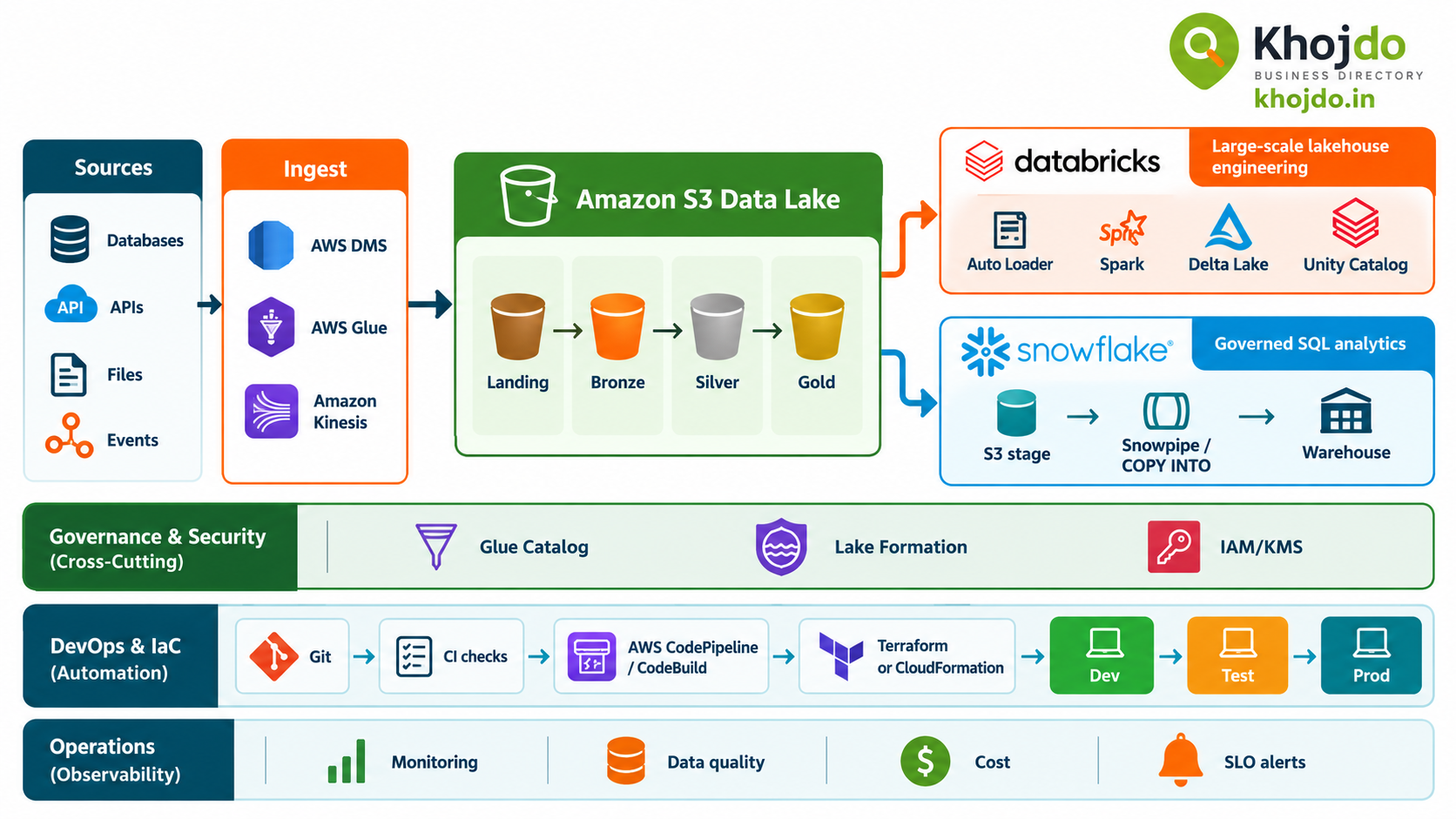
Where Databricks, Dremio, and Starburst fit
- Databricks: A strong option when the organization already uses Spark and Delta for large-scale ingestion and processing. Auto Loader supports file ingestion with schema inference/evolution and rescued data patterns; it adds a separate platform and operating model alongside Fabric.
- Dremio: Primarily a lakehouse SQL and query platform for accessing data across sources, with Iceberg and query acceleration capabilities. It can help downstream discovery and analytics, but should not be assumed to replace source-aware CDC or ingestion orchestration.
- Starburst: A Trino-based distributed SQL platform for querying across data lakes and other sources. It can reduce the need to copy data just to query it, but federation is not the same as ingesting and durably processing CDC into OneLake.
These technologies can complement Fabric. For example, Databricks may process a high-volume file feed into Delta, while Fabric accesses curated data through a shortcut; Starburst or Dremio may serve cross-source SQL queries. Validate catalog, table-format, security, and feature compatibility in a proof of concept before designing a production dependency.
Optimize utilization, ROI, and SLA
- Size from measured bottlenecks: Measure source throughput, destination throughput, network capacity, and Fabric capacity use before tuning parallelism.
- Control backfills: Partition large historical loads, schedule them separately from latency-sensitive production work, and use restartable chunks.
- Avoid needless copies: Shortcuts can reduce duplicated storage and movement, but compare remote query cost, egress, latency, and source availability against a managed copy.
- Protect source systems: Set concurrency and batch limits; a faster pipeline that degrades an operational database can reduce overall business value.
- Measure quality and freshness, not just job success: A successful copy can still contain missing, duplicated, or late records.
- Calculate ROI across the full design: Include capacity, storage, cloud egress, platform licenses, operational effort, reprocessing, and business impact of stale data.
Common mistakes and mitigation
- Treating OneLake as the ingestion service: OneLake provides the shared lake; select Data Factory, CDC/Mirroring, Eventstreams, or another supported ingestion tool for the pattern.
- Assuming petabyte storage means petabyte throughput: Storage scale and ingestion rate are different. Benchmark the full path and plan controlled parallelism and backfills.
- Using a watermark when deletes matter: Watermark-based loads may not detect deleted rows. Use supported CDC or design a reconciliation process.
- Retrying every failure the same way: Backoff helps with transient throttling; it won’t fix invalid credentials, incompatible schema, or bad mappings. Classify errors and retry selectively.
- Automatically accepting every schema change: Unreviewed changes can break downstream consumers. Validate, version, and communicate schema updates.
- Using shortcuts without testing dependency failure: A remote source outage can make downstream queries stale or unavailable. Define alerting, fallback, and copy strategies for critical data.
- Building one long, tightly coupled pipeline: A late failure can force unnecessary work to rerun. Split ingestion, transformation, and serving into recoverable stages.
Mitigation plan for rollout
- Start with one dataset and define its owner, volume, change pattern, freshness SLO, and recovery target.
- Test a representative backfill and ongoing load, including late records, deletes, schema changes, 429 responses, and source outages.
- Compare copy, CDC/Mirroring, and shortcut approaches on performance, reliability, permissions, and total cost.
- Build replayable Bronze-to-Silver-to-Gold processing with idempotent writes and data-quality checks.
- Set alerts and assign operational ownership before production release.
- Scale to additional sources only after the pilot meets its measured ROI and SLO targets.
Microsoft official video
Watch Microsoft Fabric: Unify your data for analytics & AI with Shortcuts, Mirroring & Data Factory from Microsoft Mechanics for an official overview of Fabric data integration and shortcuts.
The practical advantage of Fabric is the integration between its ingestion, storage, processing, and analytics experiences. Databricks, Dremio, and Starburst may be the better fit for particular processing or query needs. Choose by workload and measured service targets—not by treating every product as the same kind of tool.