AWS Data Architecture with Snowflake, Databricks, and DevOps
An end-to-end AWS data architecture guide connecting S3, Databricks, Snowflake, and DevOps, with practical patterns for ingestion, governance, CI/CD, operational challenges, ROI, and SLAs.
A modern data platform needs to do more than move data. It must ingest reliably, preserve data quality, support analytics, protect sensitive information, and stay within cost and service targets. On AWS, Amazon S3 can provide the shared data lake foundation, while Databricks and Snowflake provide different processing and analytics capabilities.
This guide walks through a reference architecture for a company that receives data from databases, APIs, files, and event streams. It uses AWS services for ingestion and storage, Databricks for lakehouse engineering, Snowflake for governed SQL analytics, and Git-based DevOps to release changes safely.
Reference architecture at a glance
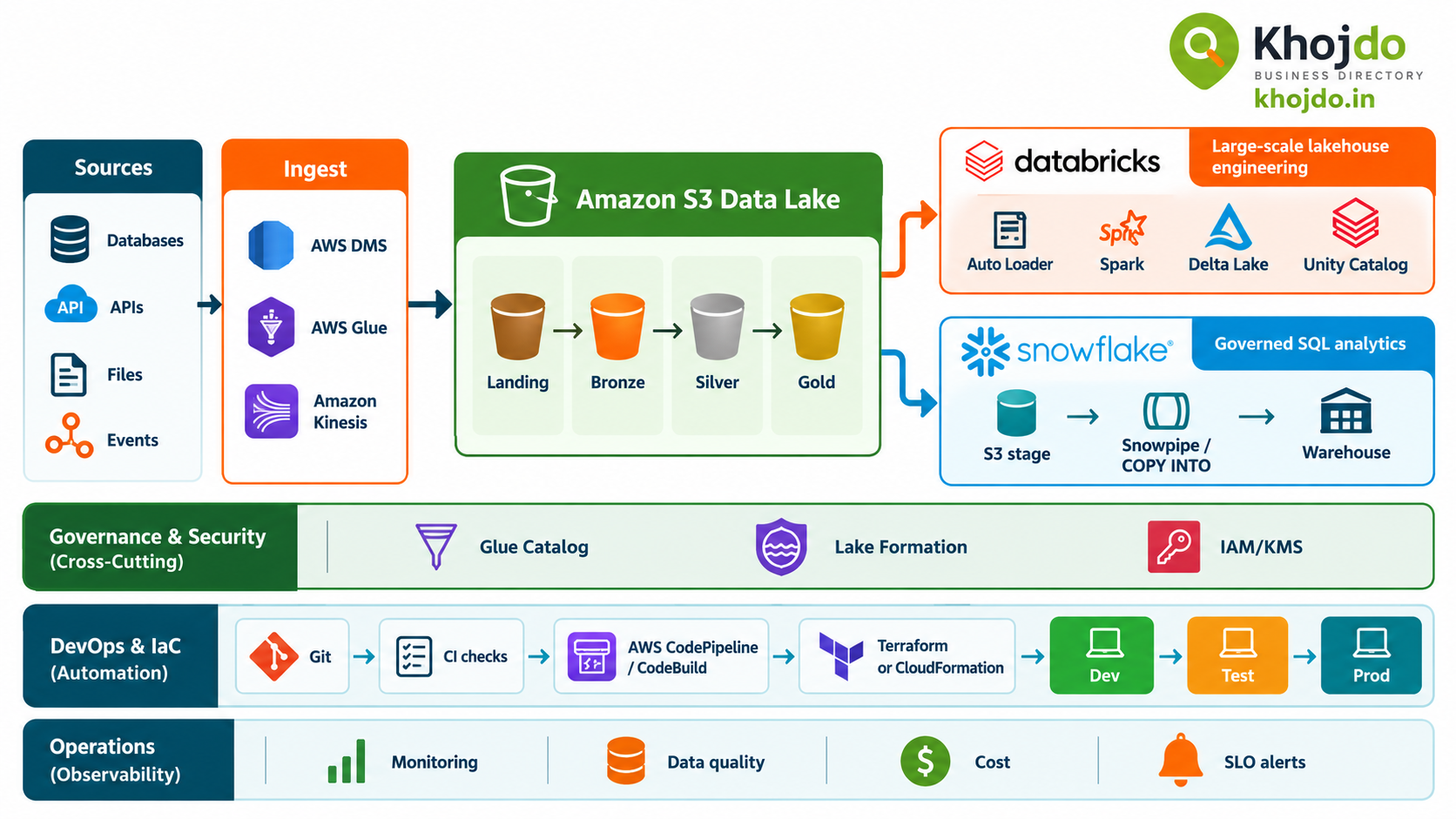
Sources → AWS ingestion → Amazon S3 landing and lake layers → Databricks transformations → Snowflake analytics → BI and business applications
- Amazon S3: Durable object storage for landing, raw, refined, and curated data.
- AWS DMS: Database migration and replication, including change data capture where supported.
- AWS Glue: Data integration and catalog capabilities for selected batch and metadata workflows.
- Amazon Kinesis: Event ingestion for streaming data use cases.
- Databricks on AWS: Spark-based engineering, streaming, and Delta Lake processing.
- Snowflake: SQL-based warehouse analytics, using Snowpipe or bulk loading from S3 as appropriate.
- AWS IAM, KMS, and Lake Formation: Identity, encryption, and data access controls for AWS resources.
- Unity Catalog: Databricks governance for data, AI assets, and lineage within Databricks.
- DevOps pipeline: Git, automated checks, infrastructure as code, and controlled promotion across environments.
These services can share data, but they do not automatically create one unified governance or cost model. Assign a clear owner for each dataset, transformation, and permission boundary.
Step-by-step implementation
1. Start with business and service requirements
Identify the business outcomes, data owners, source systems, consumers, data classifications, expected volumes, and refresh needs. Define service-level objectives (SLOs) such as data freshness, pipeline success rate, recovery time, and report availability. State whether the workload needs batch, near-real-time, or streaming delivery.
2. Establish the AWS foundation
Create separate development, test, and production accounts or environments according to the organization’s security model. Configure S3 buckets and prefixes, IAM roles, encryption keys, network paths, audit logging, lifecycle policies, and access boundaries. Prefer short-lived role-based access to long-lived static credentials.
3. Ingest source data into S3
Choose the ingestion path based on the source and latency target:
- Use AWS DMS for supported database replication or CDC patterns.
- Use AWS Glue or another managed integration tool for suitable scheduled batch loads.
- Use Kinesis for event streams that need low-latency ingestion.
- Use controlled API clients or transfer services for application exports and file feeds.
Store source-aligned data in a landing or raw area. Capture ingestion time, source identifiers, batch IDs, and CDC positions so that data can be traced and replayed.
4. Process data with Databricks
Use Databricks Auto Loader for incremental discovery of new files in supported cloud storage, and use Spark with Delta Lake for transformations that need scalable processing. Organize data using a medallion pattern: Bronze for source-aligned data, Silver for validated and conformed data, and Gold for curated business outputs.
Use Unity Catalog to manage Databricks permissions and lineage. Define schema evolution deliberately: allow safe additive changes, route incompatible records for review, and test changes against downstream tables and models.
5. Serve analytics with Snowflake
For files in S3, configure a Snowflake storage integration using an AWS IAM role and restrict allowed bucket paths. This avoids embedding AWS access keys in stage definitions. Use bulk COPY INTO for scheduled loads, or Snowpipe auto-ingest when new files should be loaded as they arrive.
Choose where transformations happen. If Databricks owns the curated Delta tables, let Snowflake consume defined outputs rather than rebuilding the same logic independently. If Snowflake owns a data product, make that ownership clear and avoid competing writers to the same dataset.
6. Publish governed data products
Define stable tables, views, and business metrics for analytics teams. Apply least-privilege access, mask or tokenize sensitive fields as required, and document data lineage and quality rules. Connect BI tools such as Power BI to the approved serving layer rather than directly to raw data.
7. Add DevOps and CI/CD
- Version control: Store Terraform or CloudFormation, Databricks notebooks and job definitions, SQL objects, pipeline configuration, and tests in Git.
- Branch and review: Develop in feature branches and require pull-request review before merging to the main branch.
- Run automated checks: Validate infrastructure plans, SQL syntax, notebook code, schemas, data contracts, security policies, and unit tests.
- Deploy to development: Use AWS CodePipeline and CodeBuild, or an existing CI platform, to apply infrastructure and publish application artifacts.
- Promote to test: Deploy with environment-specific parameters and secrets. Run integration, data-quality, performance, and access-control checks.
- Approve production: Require release approval, deploy in dependency order, run smoke tests, and retain a rollback or redeployment plan.
Use AWS Secrets Manager or an approved secret store for credentials. Keep data files, access tokens, passwords, and environment-specific secrets out of Git. AWS CodePipeline integrates with CloudFormation for controlled infrastructure delivery; infrastructure and data-code releases should be observable and repeatable.
Key challenges and mitigation
- Late-arriving or out-of-order records: Keep event time and ingestion time, preserve CDC positions, and define a correction window. Use idempotent merge logic and a replay process so late events can update affected outputs.
- High volume and backfills: Separate historical loads from daily increments, partition work by a source-supported key, and tune concurrency through benchmarking. Monitor source limits, S3 request patterns, cluster utilization, Snowflake warehouse consumption, and file sizes.
- CDC complexity: Confirm the source and connector support the required inserts, updates, and deletes. Store checkpoints, deduplicate by key and change sequence, and test restart behavior before production.
- Schema drift: Treat schemas as contracts. Validate changes, allow only approved evolution, quarantine incompatible records, and test downstream consumers before release.
- Rate limits and transient failures: Use bounded concurrency, batching, retry with backoff, and dead-letter or quarantine paths. Avoid retry storms against a source API or database.
- Duplicate processing across platforms: Decide which platform owns each transformation and curated dataset. Avoid reimplementing the same business rules in Databricks and Snowflake without a documented reason.
- Governance gaps: Map AWS IAM/Lake Formation, Unity Catalog, and Snowflake roles to clear ownership and access policies. Review cross-account access, encryption keys, audit logs, and sensitive-data handling together.
- Cross-platform latency and cost: Measure data transfer, storage duplication, query patterns, and compute use across AWS, Databricks, and Snowflake. Keep workloads and storage regions aligned when practical and validate actual billing behavior.
- Complex downstream dependencies: Split ingestion, transformation, and serving into recoverable stages. Add checkpoints, quality gates, dependency tracking, alerting, and clear operational ownership.
ROI and SLA considerations
- Measure ROI against business outcomes: Track hours saved from manual integration, time from source arrival to usable data, report adoption, pipeline support effort, and avoided duplicate processing.
- Include total platform cost: Model S3 storage and requests, data transfer, Databricks compute, Snowflake credits, orchestration, monitoring, licenses, and operations staff.
- Use workload-specific service objectives: Define freshness, completeness, pipeline success, recovery time, and availability separately for each data product.
- Measure end-to-end freshness: Start the clock when data is produced at the source and stop when the validated result is available to the consumer.
- Test before committing to targets: Snowpipe typically loads data shortly after notification, but Snowflake does not guarantee a specific load latency. Benchmark representative file sizes, arrival patterns, and transformation complexity.
- Plan failure recovery: Document replay windows, checkpoint recovery, backfill procedures, and ownership for source outages, failed transformations, and stale reports.
Best-practice rollout plan
- Choose one high-value dataset and define its owner, users, freshness target, and security needs.
- Build a small end-to-end path from source to S3, Databricks, Snowflake, and BI.
- Test late data, CDC deletes, schema changes, rate limits, and recovery from partial failure.
- Automate infrastructure and code deployment through Git-based CI/CD.
- Review actual cost, processing time, quality, and consumer value against the SLO and ROI baseline.
- Scale to additional data domains only after the pilot is supportable and repeatable.
A successful cloud data architecture is not defined by the number of services it uses. It is defined by clear data ownership, dependable pipelines, governed access, recoverable operations, and measurable value to the business.