OneLake and Shortcuts: Choosing the Right Data Foundation
Learn how Microsoft Fabric OneLake and shortcuts work, how they differ from Delta tables, Dremio, and Starburst, and how to choose, optimize, monitor, and deploy the right data architecture.
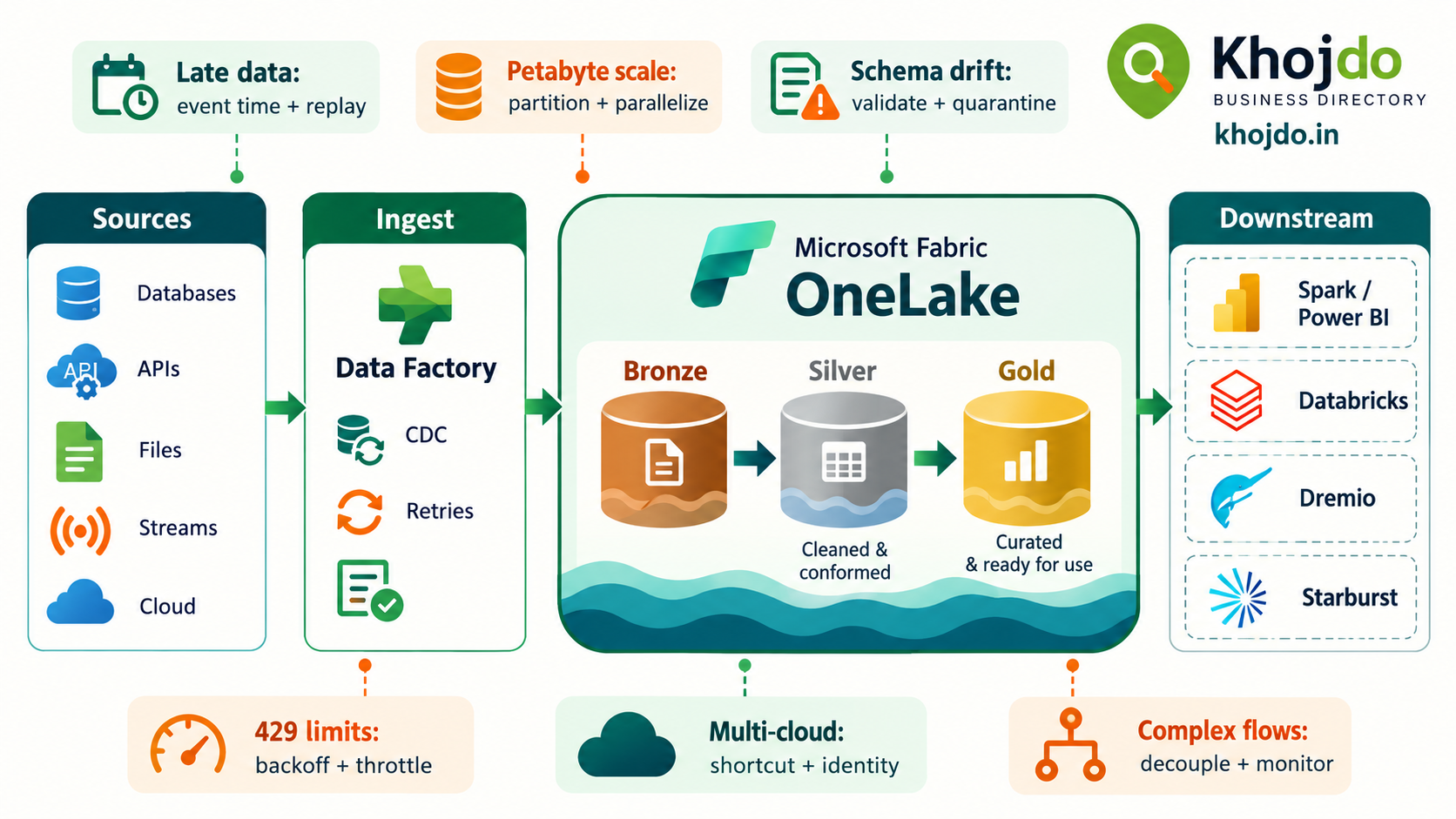
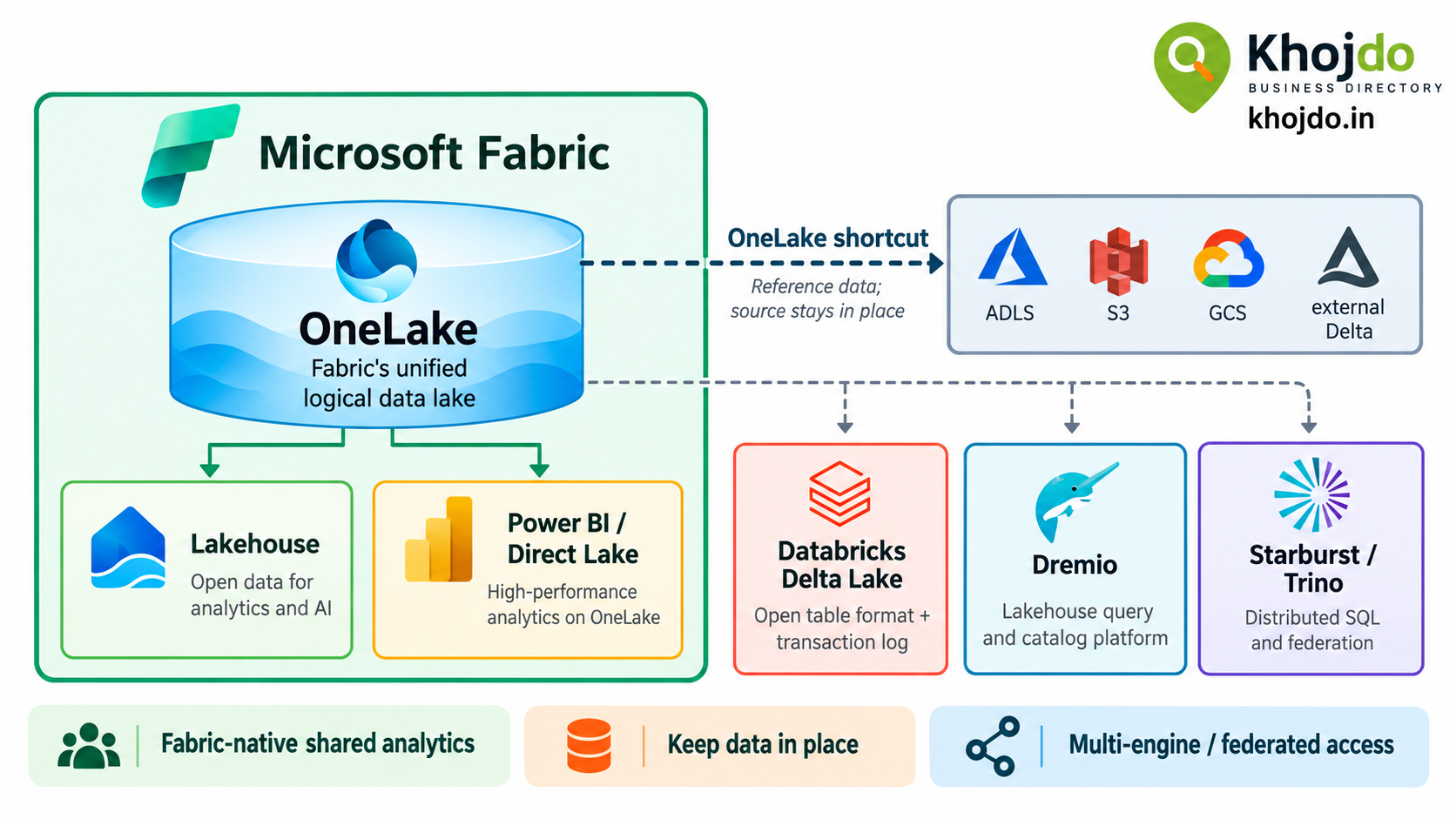
Microsoft Fabric includes OneLake, a shared logical data lake for an organization’s Fabric analytics data. A OneLake shortcut is a reference to data in another location: it makes that data accessible through OneLake without first copying it into the destination item. Together, they can simplify data access across Fabric workloads and help teams avoid unnecessary copies.
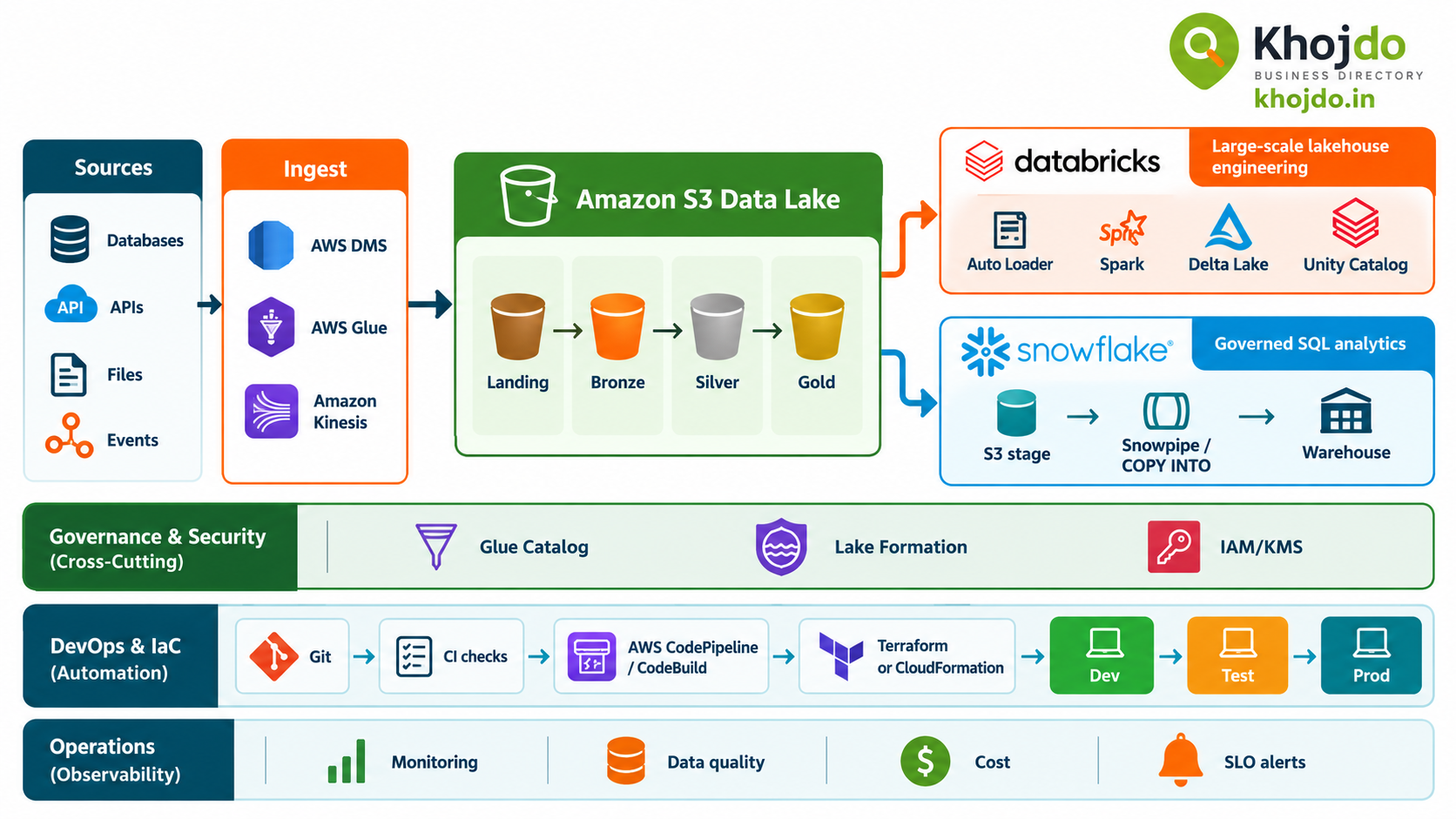
OneLake, a shortcut, a Delta table, Dremio, and Starburst are not equivalent products. They sit at different layers: OneLake is a data lake foundation, a shortcut is a data reference, Delta is a table format and transaction layer, and Dremio and Starburst are analytics platforms. Choose based on where data lives, which engines need it, and the performance, governance, and reliability targets you must meet.
How OneLake and a shortcut work
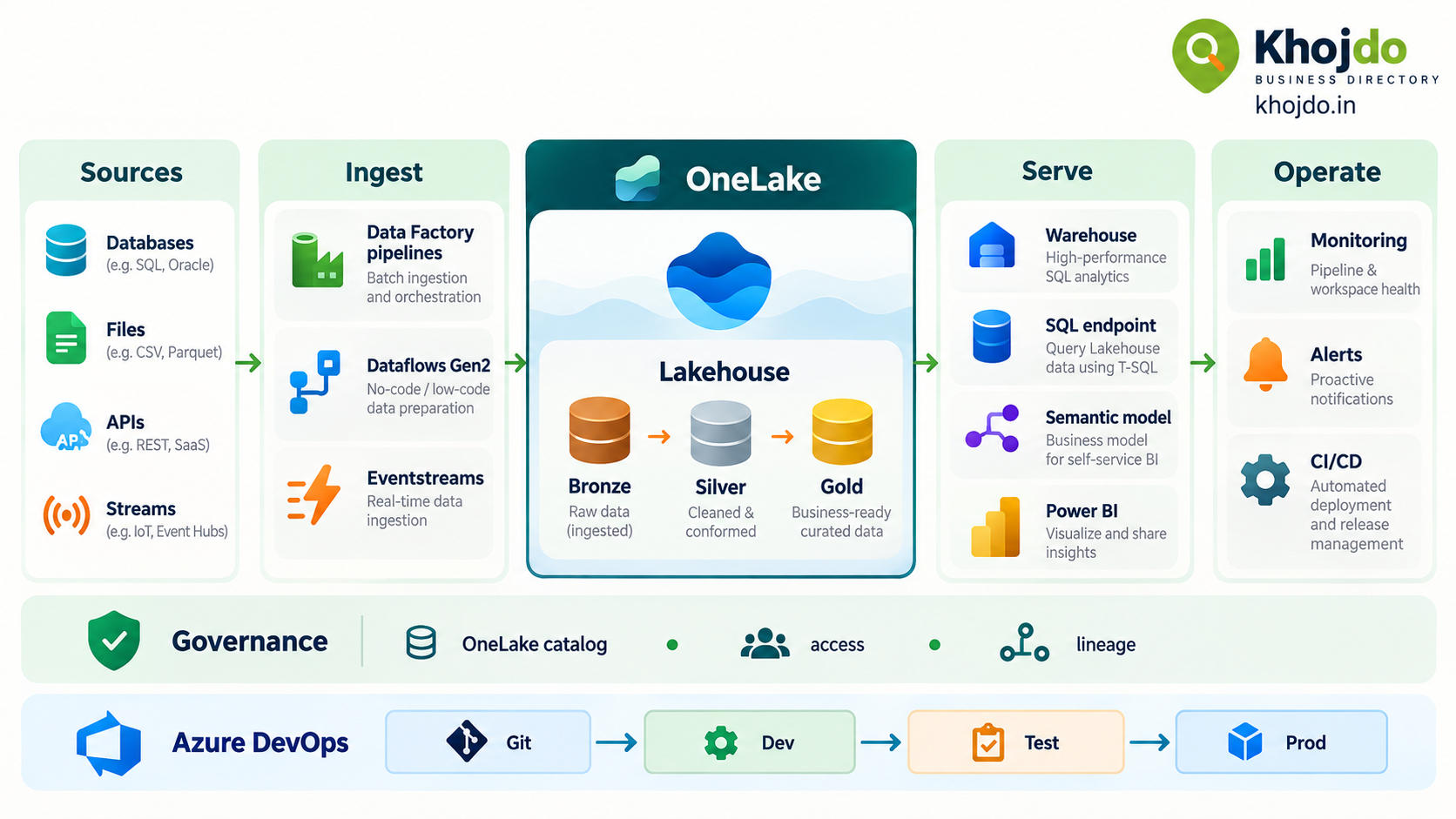
Each Fabric tenant includes OneLake. Fabric items such as Lakehouses and Warehouses use it as their storage foundation. Within OneLake, a Lakehouse can store files and tables, while Fabric workloads access data through their own tools and engines.
A shortcut appears as a folder-like reference in a OneLake location. It can point to another OneLake item or supported external storage such as ADLS Gen2, Amazon S3, or Google Cloud Storage. The underlying data remains in its source location. Fabric can read it through the shortcut, subject to source connectivity and access permissions.
Example: A retailer keeps its curated sales data in an ADLS Gen2 account used by its Databricks team. The Fabric analytics team can create a shortcut to the relevant Delta data in a Lakehouse, then query it for Power BI reporting—without making a second full copy first. Before relying on this design, test permissions, Delta compatibility, freshness, query latency, and source availability.
Services and technologies in one line
- OneLake: Fabric’s shared logical data lake for data used across Fabric experiences.
- OneLake shortcut: A pointer that exposes supported data from another OneLake location or external source without first copying it.
- Databricks Delta Lake table: A table stored in Parquet files with a transaction log that provides table operations such as ACID transactions and version history.
- Dremio: A lakehouse and SQL analytics platform for querying data across sources, with Apache Iceberg support and query acceleration features.
- Starburst: A Trino-based distributed SQL platform for querying data lakes and federating queries across connected sources.
Which option should you choose?
| Option | Best fit | Key consideration |
|---|---|---|
| OneLake | Fabric-first analytics where multiple Fabric workloads should share a common data foundation. | It does not eliminate the need to design ownership, access, capacity, data layout, and recovery processes. |
| OneLake shortcut | Keeping data in its existing storage location while exposing it to Fabric or connecting Fabric items. | Reads depend on source permissions, connectivity, availability, and performance. “No copy” does not mean “no dependency.” |
| Databricks Delta table | Teams already using Databricks and Delta for Spark, streaming, or lakehouse workloads. | Delta is a table format, not a storage platform by itself. Interoperability depends on the storage location, catalog, protocol features, and the consuming engine. |
| Dremio | SQL-led lakehouse analytics across data sources, especially when teams want Dremio’s Iceberg and query acceleration capabilities. | Plan for the platform, catalog, engine sizing, governance, and operating skills alongside underlying storage. |
| Starburst | Distributed SQL and federation across multiple data sources, including data lakes and databases. | Starburst queries data; it does not replace the underlying storage or table format. Cross-source joins can create latency and resource costs. |
Step-by-step: implement OneLake and a shortcut
1. Define the use case and targets
Identify the data owner, source, consumers, expected volume, freshness target, security requirements, and recovery expectations. Set a measurable service-level objective (SLO), for example: “The sales dashboard reflects the previous day’s completed transactions by 7 a.m. on 99% of business days.”
2. Create the Fabric foundation
Set up the Fabric capacity, workspaces, roles, and Lakehouse or other destination item. Use separate development, test, and production environments where the workload requires controlled promotion. Agree on naming, ownership, classification, and retention before multiple teams start publishing data.
3. Decide whether to shortcut or copy
Use a shortcut when the data should remain at its source and the source can meet your access, latency, availability, and cost requirements. Copy or ingest the data when you need an independently available snapshot, predictable local performance, transformation, or a recovery boundary. Test with representative query patterns before choosing.
4. Create and secure the shortcut
In the Lakehouse explorer, choose New shortcut, select an internal OneLake location or supported external source, configure the required connection, and select the target path. Grant only the permissions required to create and use the shortcut. Test access using the same identity and workload mode your users and reports will use.
5. Validate the data path
Check schema, row counts, freshness, nulls, duplicate keys, and representative query performance. If the shortcut points to Delta data, validate that the source table and consuming Fabric workload support the operations and metadata you need. Add a data-quality check before publishing the data to business users.
6. Publish and monitor
Expose the validated data through the appropriate Fabric workload, such as a Lakehouse SQL analytics endpoint, a Warehouse, or a semantic model. Monitor source availability, data freshness, query duration, failures, and capacity consumption. Define who responds when the source is unavailable or the data misses its target.
Optimize utilization, ROI, and SLA
- OneLake: Reduce unnecessary duplicate copies when Fabric workloads can reuse shared data. Organize data around clear ownership and access boundaries; monitor capacity and storage use so a shared foundation does not become an unowned cost center.
- OneLake shortcuts: Measure remote-read latency, source availability, and any cloud egress charges. Use shortcut caching where supported and appropriate. For strict response-time or availability targets, consider whether a managed copy is safer than a live dependency on a remote source.
- Databricks Delta: Use Delta when its transaction log, streaming integration, and existing Databricks workflows provide value. Optimize file layout and table maintenance for actual query patterns; avoid small-file buildup and verify protocol compatibility before sharing tables with other engines.
- Dremio: Size and isolate engines around workload needs, review query profiles, and use acceleration features selectively. Confirm that acceleration refresh and source freshness remain consistent with your reporting SLO.
- Starburst: Push filters and aggregations toward sources when supported, avoid moving large intermediate results across connectors, and size clusters for concurrency and query complexity. Monitor query failures, queue time, and source-specific bottlenecks.
- For all options: Calculate ROI from business outcomes—reduced copying and pipeline maintenance, faster data availability, fewer failed reports, or less manual reconciliation—not only infrastructure cost.
A shortcut can reduce data duplication, but it does not itself guarantee an SLA. End-to-end freshness and availability also depend on the source, network, permissions, engine, transformations, and reporting layer. Measure the full path and document what happens when any dependency is unavailable.
Azure DevOps and Git deployment steps
- Connect the development workspace: A workspace admin connects Fabric Git integration to the Azure DevOps repository, branch, and folder used by the team.
- Develop and commit supported items: Work on a feature branch, review item definitions, and commit changes. Check Microsoft’s current supported-item list; Git integration does not version the data stored in OneLake.
- Review changes: Open a pull request, require peer review, and run available validation for notebooks, SQL, pipelines, permissions, and data contracts.
- Deploy to test: Choose a consistent release approach: Fabric deployment pipelines for workspace-to-workspace promotion, or an Azure DevOps pipeline calling the supported Fabric APIs/CLI for a Git-driven release.
- Apply environment-specific settings: Keep source paths, connection bindings, parameters, and credentials environment-specific. Store secrets in approved secret-management services rather than Git.
- Promote and verify production: Require approval, deploy in dependency order, run smoke tests, validate data freshness and permissions, and keep a tested rollback or redeployment procedure.
Common mistakes and mitigation
- Comparing unlike layers: OneLake is a data foundation, a shortcut is a reference, Delta is a table format, and Dremio/Starburst are query platforms. Mitigation: draw the storage, table, catalog, compute, and BI layers before selecting products.
- Assuming a shortcut removes all data movement or cost: Queries still read data from a source and may incur latency or egress. Mitigation: benchmark actual usage and compare shortcut, cache, and copy strategies.
- Overlooking permissions: The shortcut can exist while users or semantic models still lack the expected source access. Mitigation: test with the real user identity and document connection and target permissions.
- Assuming every Delta table works everywhere: Engines and catalogs can differ in supported protocol features. Mitigation: validate interoperability with the actual table, catalog, and reader versions.
- Ignoring remote-source failure modes: A Fabric report can fail or become stale if its shortcut target is unreachable. Mitigation: define freshness alerts, fallback behavior, and a managed-copy option for critical workloads.
- Deploying without environment controls: Development settings or credentials can leak into test or production. Mitigation: parameterize configuration, use secure connections, and require release approval.
Mitigation plan for a low-risk rollout
Start with one domain: Choose a high-value dataset and identify its owner, source, users, and service target.
Run a proof of value: Compare OneLake-native storage, a shortcut, and the existing platform using representative query and freshness tests.
Review cost and reliability: Include capacity, storage, egress, operations, source outages, and data recovery in the comparison.
Release through controlled environments: Version supported definitions in Git, validate in test, and promote with approvals and environment-specific configuration.
Expand based on evidence: Add workloads only after the initial design meets its ROI, access, performance, and SLO targets.
Microsoft’s official video
Watch Microsoft Fabric: Unify your data for analytics & AI with Shortcuts, Mirroring & Data Factory from Microsoft Mechanics for an official overview of shortcuts and related Fabric capabilities.
OneLake is most compelling when Fabric workloads need a shared data foundation. Shortcuts are most useful when data should remain in its existing location and the source can meet the required service targets. For Databricks Delta, Dremio, or Starburst, choose based on the engine and table-format requirements already present in your architecture—and verify interoperability before committing.