Microsoft Fabric, Step by Step: Ingestion to Monitoring and CI/CD
A practical Microsoft Fabric guide covering platform basics, service choices, ingestion-to-reporting implementation, capacity and SLA optimization, common mistakes, and Azure DevOps/Git deployment.
“Azure Fabric” usually refers to Microsoft Fabric, Microsoft’s SaaS analytics platform. It brings data integration, engineering, warehousing, real-time analytics, and Power BI into one environment built around OneLake. Its main appeal is a shared data foundation and connected experiences; teams still need to choose the right storage, compute, security, and deployment patterns for their workload.
Why consider Microsoft Fabric?
In a traditional cloud data stack, teams may assemble separate services for storage, orchestration, transformation, analytics, governance, and reporting. Fabric provides these experiences within one platform and lets them work over OneLake. This can reduce integration and data-copying work, especially for organizations already using Microsoft analytics tools.
Fabric is not automatically the best fit for every workload. Existing platforms, specialized processing needs, regulatory constraints, team skills, and capacity economics still matter. Treat it as an integrated option to evaluate—not a reason to migrate every data system.
Core services in one line
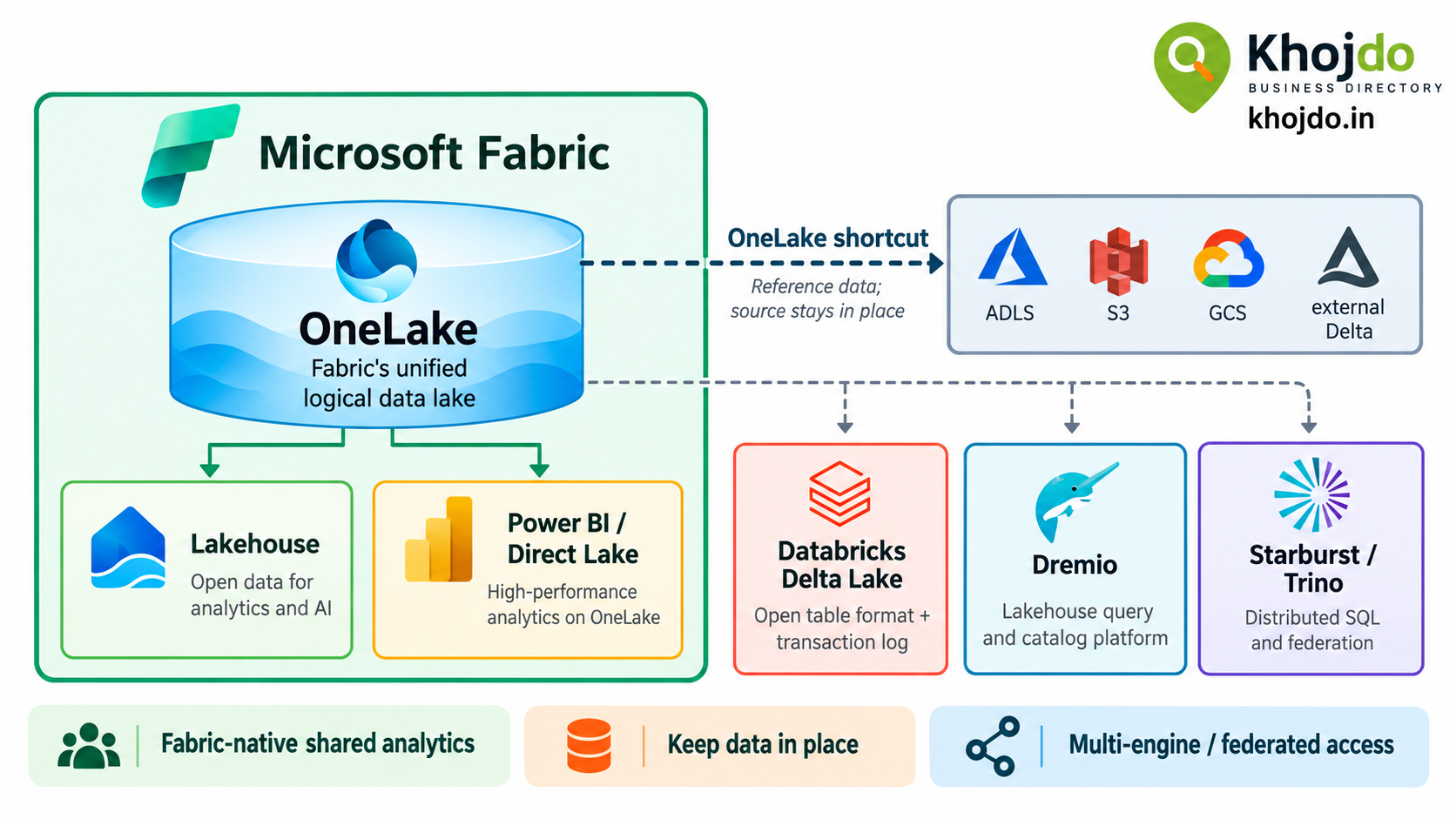
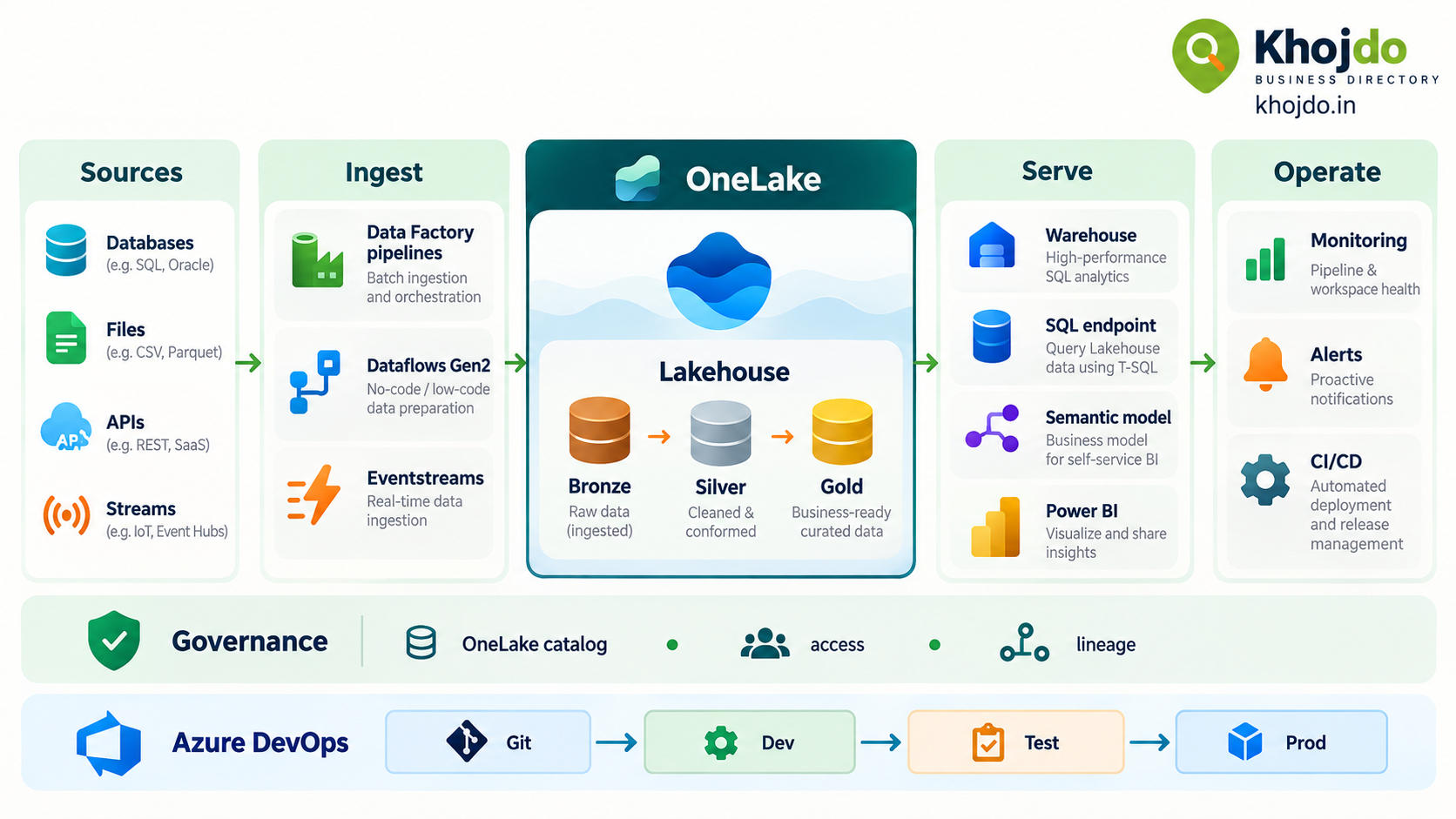
- OneLake: Fabric’s tenant-wide logical data lake for data used across Fabric workloads.
- OneLake shortcut: A reference to data held elsewhere, which can avoid creating another copy when access and performance requirements allow.
- Data Factory pipeline: Orchestrates and schedules data movement and workflow activities.
- Dataflow Gen2: A low-code Power Query experience for connecting, shaping, and loading data.
- Eventstream: Ingests and routes streaming events for real-time scenarios.
- Lakehouse: Combines lake-style storage with Spark-based engineering for structured and unstructured data.
- Notebook: Runs code such as Python, Spark SQL, or Scala for transformations, analysis, and data science.
- Warehouse: Provides a relational analytics store developed primarily with T-SQL.
- Lakehouse SQL analytics endpoint: Provides read-only T-SQL queries over Lakehouse Delta tables.
- Semantic model and Power BI: Define business measures and relationships, then turn data into reports and dashboards.
- Monitoring and Capacity Metrics: Help investigate pipeline runs, capacity consumption, and throttling.
Step-by-step implementation
1. Define the outcome and service levels
Write down the business question, data owner, users, expected data volume, refresh frequency, security requirements, and target freshness. Define measurable service-level objectives (SLOs), such as “sales data available by 7 a.m.” or “95% of daily loads finish within 30 minutes.” Include source-system delays and downstream report refreshes in the measurement.
2. Set up environments and access
Create separate development, test, and production workspaces. Choose the appropriate Fabric capacity and region, configure workspace roles, and establish approved connections to source systems. Keep credentials out of notebooks and pipeline definitions; use managed identity or approved secret-management patterns where supported.
3. Ingest data
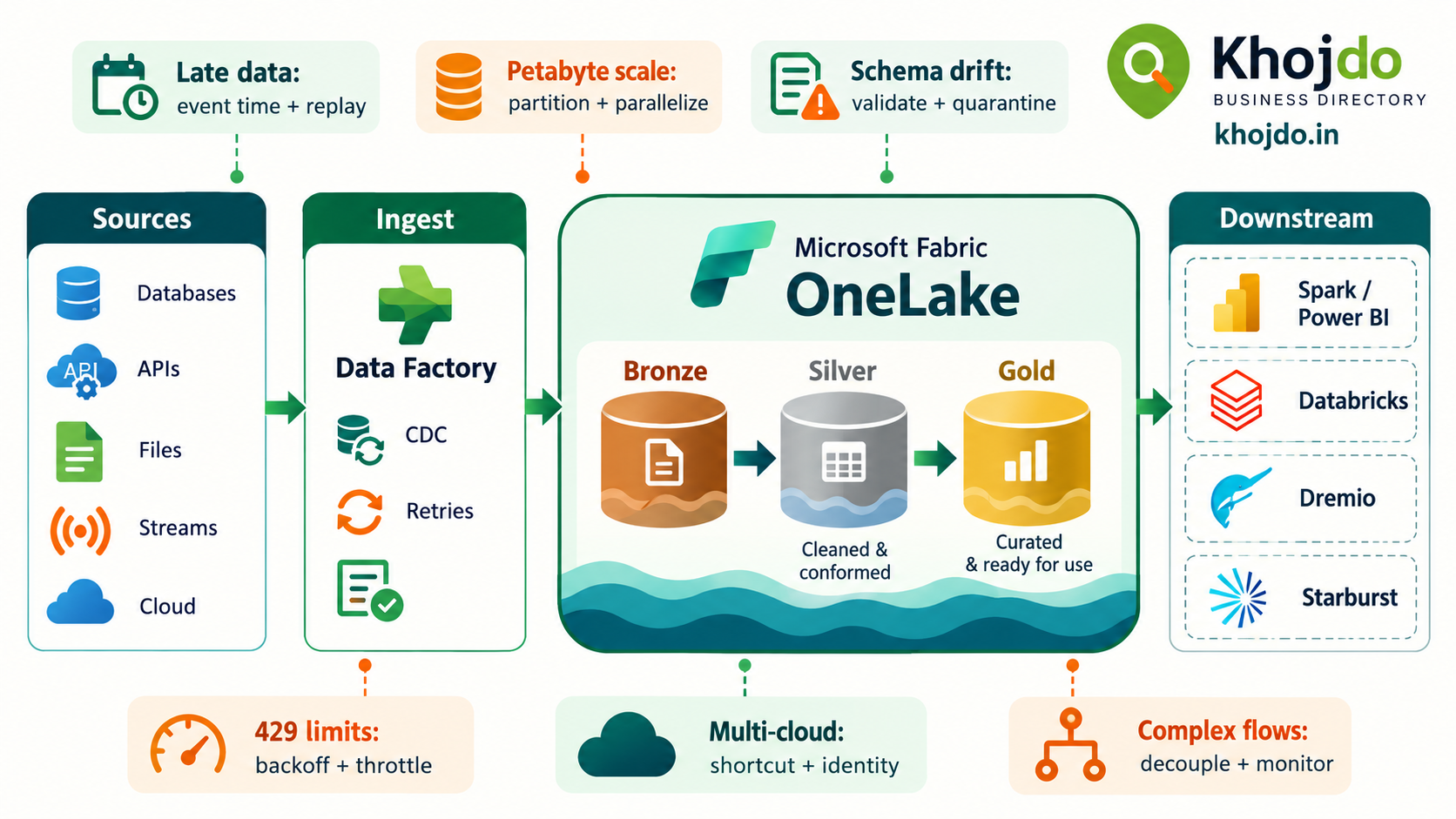
For scheduled batch data, use a Data Factory pipeline with copy activities. Use Dataflow Gen2 when a low-code Power Query transformation is suitable. For event streams, use Eventstream and a real-time destination. Prefer incremental loading with a watermark or change tracking over repeated full reloads when the source supports it.
4. Land and organize the data
Store data in OneLake. A common pattern is a Lakehouse with three logical layers: Bronze for source-aligned raw data, Silver for validated and conformed data, and Gold for business-ready outputs. Keep source metadata, load timestamps, and data quality status so records can be traced and reprocessed.
5. Transform and validate
Use notebooks for code-heavy or Spark-based transformations and Dataflow Gen2 for suitable low-code shaping. Validate schemas, required fields, duplicates, and business rules before promoting data to Gold. Quarantine invalid records with a reason instead of silently dropping them.
6. Serve analytics
Choose the serving layer based on how the data will be used. Use a Warehouse when the workload is relational and T-SQL-oriented or needs multi-table transactions. Use a Lakehouse for Spark-oriented engineering or mixed data types; its SQL analytics endpoint is read-only. Build a semantic model with agreed definitions for measures, then publish Power BI reports for users.
7. Orchestrate and monitor
Schedule dependencies, set sensible retries, and make activities safe to rerun. Review pipeline run history and failure details; configure alerts for failures or missed freshness targets. Use the Fabric Capacity Metrics app to identify capacity pressure and high-consumption items. Track pipeline duration, success rate, data freshness, and report availability against the SLOs defined in step one.
Optimize utilization, ROI, and SLAs
- Right-size capacity from evidence: Start with a realistic workload estimate, then use Capacity Metrics to review peaks, concurrency, and throttling before changing capacity.
- Reduce avoidable compute: Use incremental loads, filter early, avoid unnecessary full refreshes, and tune Spark resources to the workload.
- Limit duplicate storage and movement: Consider OneLake shortcuts where the source, permissions, availability, and query performance meet requirements. A shortcut avoids a copy but does not remove source-system dependencies.
- Match the serving service to the job: Do not choose Warehouse or Lakehouse by habit; consider development language, data types, transaction needs, and access pattern.
- Measure ROI in business terms: Track hours of manual work removed, time to deliver data, failure and reprocessing rates, report adoption, and total capacity and storage cost.
- Make SLAs observable: Measure freshness from source arrival through ingestion, transformation, model refresh, and report availability. Set alerts and define an owner and recovery action for each failure.
A platform capacity setting alone does not guarantee an end-to-end SLA. Source availability, network paths, workload concurrency, data quality, and downstream reporting all affect the result. Validate the full path with production-like volumes before committing to a target.
Azure DevOps and Git deployment steps
- Connect the development workspace: A workspace admin connects Fabric Git integration to an Azure DevOps repository and selects the project, repository, branch, and folder.
- Develop on a feature branch: Make changes in the development workspace or supported item definitions, then commit them to Git. Check Microsoft’s supported-item list before relying on Git integration for a specific artifact.
- Review through a pull request: Use Azure Repos branch policies and peer review. Run available validation, SQL or notebook checks, and data-quality tests before merging.
- Deploy to test: Choose a consistent promotion method: Fabric deployment pipelines for workspace-based Dev → Test → Prod promotion, or a Git/API-based release flow when Git is the deployment source of truth.
- Apply environment settings: Keep environment-specific connections, parameters, and rules outside shared development values. Use approved identities and secrets; do not commit credentials or production data.
- Validate and approve production: Test permissions, data refresh, key measures, and freshness against the SLO. Require approval before production promotion, then run a smoke test and keep a rollback or redeployment plan.
Important: Git integration versions supported item definitions and workspace content; it is not a backup or version-control system for the data stored in OneLake. Confirm artifact support and deployment limitations for your chosen workflow.
Common mistakes and mitigation
- Choosing services before defining requirements: Document query patterns, data types, transaction needs, refresh targets, and team skills first.
- Reloading everything every time: Add incremental logic, watermarks, or change tracking where possible, and design safe retries.
- Putting raw, cleaned, and reporting data together without ownership: Define layer responsibilities, naming, owners, and data-quality checks.
- Assuming a shortcut solves every performance issue: Test latency, source availability, access rules, and cost for real query patterns.
- Ignoring shared capacity contention: Monitor concurrent workloads and consumption; schedule heavy jobs thoughtfully and tune based on observed pressure.
- Hard-coding environment values: Parameterize connections and settings, and validate them during promotion.
- Treating a successful pipeline run as proof of good data: Add quality checks and business-level validation before data reaches reports.
- Promising an SLA without measuring it: Instrument each stage, define alert thresholds, assign operational ownership, and test recovery procedures.
Mitigation plan for a reliable rollout
Start small: Pick one high-value use case and one source system. Define freshness, quality, security, and cost targets before building.
Prove the full path: Ingest, transform, serve, deploy, monitor, and recover using representative data volumes.
Review after each release: Compare actual cost, runtime, failure rate, and business value with the original targets.
Scale deliberately: Add sources and workloads only after ownership, access, capacity, and support processes are clear.
Microsoft Fabric works best when the team treats it as an end-to-end operating model—not just a collection of notebooks and pipelines. Start with a measurable business outcome, select the simplest fitting services, automate promotion, and keep monitoring tied to user-facing freshness and reliability.