AWS Data & AI Architect Cheat Sheet: Services, Modeling, DevOps, and Delivery
A practical AWS Data & AI Architect guide to choosing Glue, EMR, Databricks, Redshift, Snowflake, Athena, Dremio, and Starburst—plus modeling, governance, optimization, DevOps, scope control, and client communication.
A good data architecture is not the one with the most services. It is the one that meets business needs for freshness, reliability, security, performance, and cost with a design the team can operate.
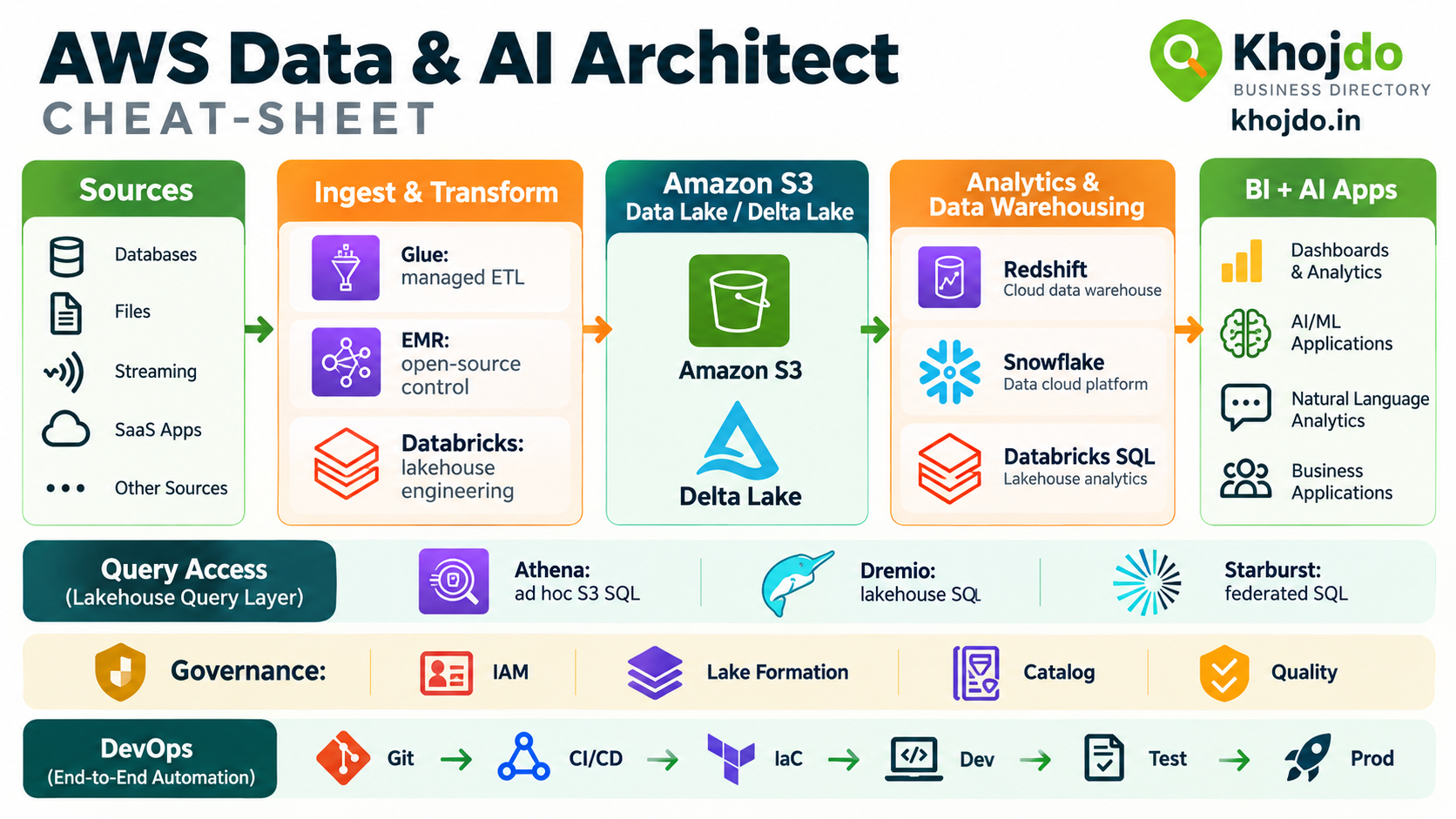
This cheat sheet helps architects choose between AWS Glue, Amazon EMR, Databricks, Redshift, Snowflake, Databricks SQL, Athena, Dremio, and Starburst. It also covers modeling, governance, DevOps, cost optimization, scope control, and how to discuss a delivery delay with a client.
1. Choose the processing service
| Service | Choose it when… | Example |
|---|---|---|
| AWS Glue | You need managed, serverless-style ETL and catalog integration, and the workload fits Glue’s supported runtimes and connectors. | Run scheduled transformations on S3 data and catalog tables for Athena or Redshift Spectrum. |
| Amazon EMR | You need more control over open-source frameworks, runtime configuration, cluster resources, or specialized Spark/Hadoop workloads. | Run a custom Spark process with tuned libraries and resource settings against a large S3 dataset. |
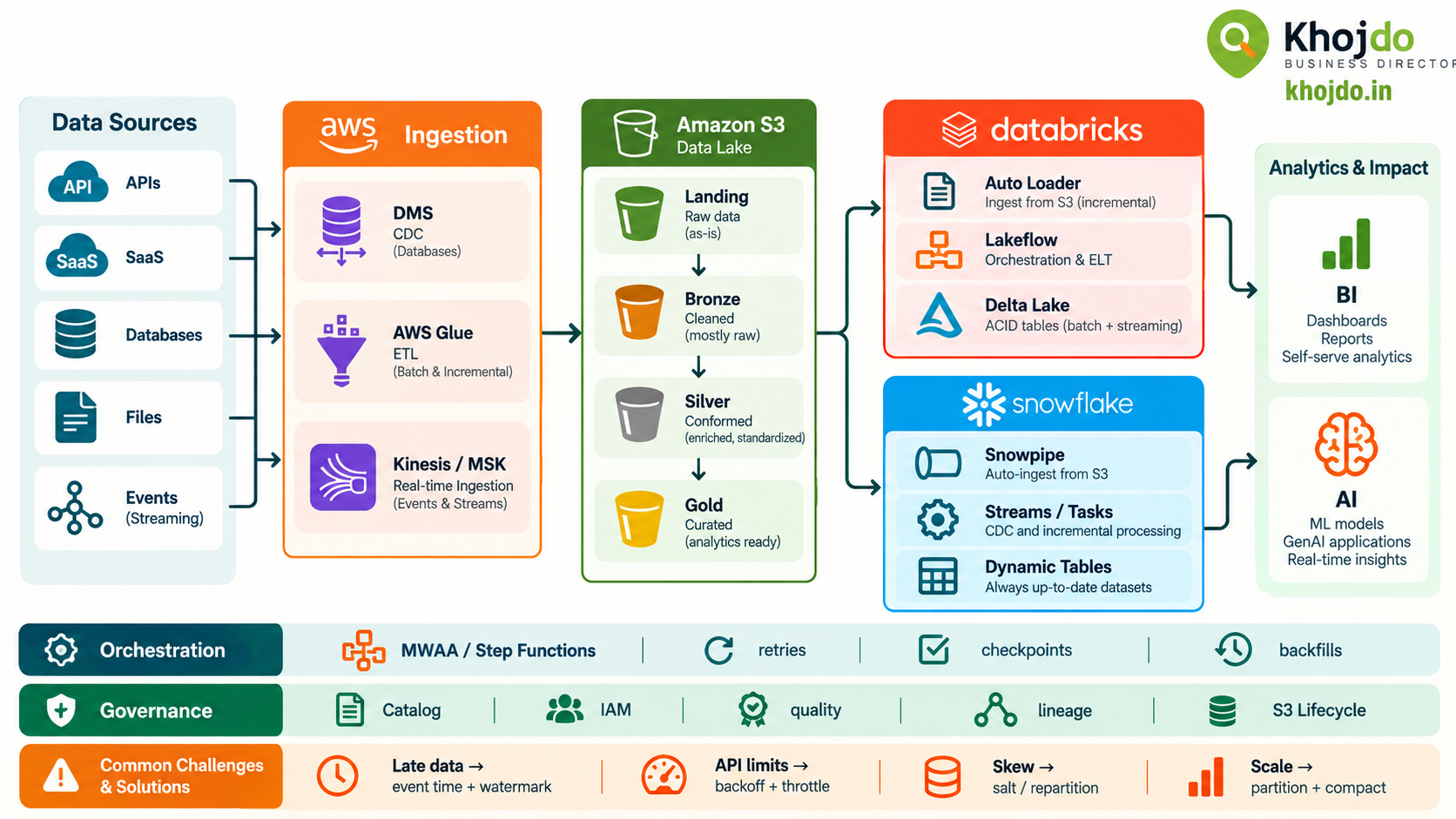
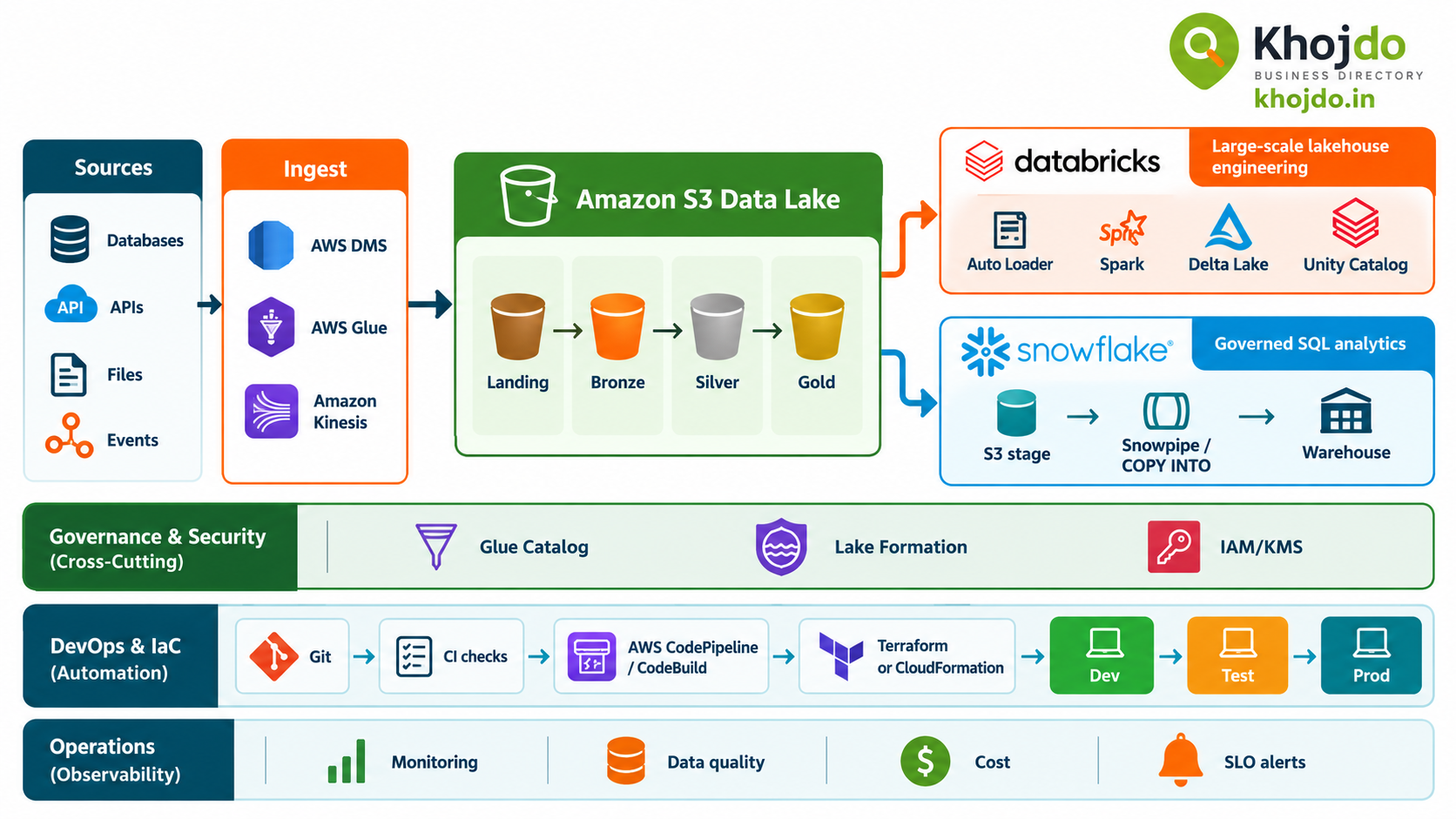
| Databricks | You want an integrated lakehouse engineering and analytics platform using Spark, Delta Lake, and Unity Catalog, especially when the team already uses Databricks. | Ingest files incrementally, refine them through Bronze/Silver/Gold layers, and serve governed Delta tables to analytics and ML. |
Decision shortcut: Start with Glue for managed ETL that fits the service; choose EMR when framework or infrastructure control is important; choose Databricks when its integrated lakehouse, governance, and engineering environment justifies the platform.
2. Choose the warehouse or lakehouse
| Service | Best fit | Check before choosing |
|---|---|---|
| Amazon Redshift | A managed AWS data warehouse for SQL analytics, data marts, and workloads that benefit from AWS-native integration. | Model concurrency, data loading, workload management, and table design. Start with automatic table optimization where suitable, then tune based on workload evidence. |
| Snowflake | A managed cloud data platform when teams value independently managed compute workloads, SQL analytics, and support for multi-cloud deployment options. | Estimate credit consumption, data movement, governance fit, and workload isolation. Clustering is not necessary for most tables and adds maintenance cost. |
| Databricks SQL | SQL warehousing over a lakehouse when data engineering, BI, and ML should work against governed open-format tables in the same platform. | Evaluate SQL performance, Unity Catalog governance, Delta table layout, analyst experience, and the cost of keeping data in the lakehouse. |
These options overlap, but they are not identical. Compare them with representative workloads, concurrency, data volumes, governance requirements, team skills, and total operating cost—not a single benchmark query.
3. Choose the query and analytics layer
| Service | Best fit | Watch for |
|---|---|---|
| Amazon Athena | Ad hoc SQL over data already stored in S3, especially when you want to query without provisioning a warehouse. | Query cost is affected by data scanned. Use columnar formats, selective filters, and sensible partitioning; avoid excessive tiny partitions. |
| Dremio | Lakehouse SQL and self-service analytics across data sources, especially when Dremio’s reflections, catalog, or workload controls provide value. | Budget for platform operations, acceleration refresh, and engine sizing. Validate that cached or accelerated results meet freshness needs. |
| Starburst | Distributed SQL and federated queries across data lakes, databases, and other connected sources. | Large cross-source joins can be slow or expensive. Test connector pushdown, source limits, and concurrency with real queries. |
| Snowflake analytics | Governed SQL analytics where data is loaded into Snowflake or accessed through supported external data features. | Decide whether data should be copied into Snowflake or queried externally; compare freshness, performance, storage, and compute costs. |
4. Select the data model
| Model | Concise definition | Use it when… |
|---|---|---|
| Star schema | A central fact table connects directly to descriptive dimension tables. | BI users need an intuitive, query-friendly model for a business process such as sales or claims. |
| Snowflake schema | A dimensional model whose dimensions are normalized into related sub-tables. | Dimension hierarchies or reuse justify the extra joins and complexity. |
| Data Vault | An integration model that separates business keys (Hubs), relationships (Links), and descriptive history (Satellites). | You need auditable history and flexible integration across changing source systems. Often publish downstream star-schema marts for BI. |
5. Govern data and AI from the start
- Assign ownership: Name business and technical owners for every source, data product, and critical metric.
- Classify data: Identify personal, confidential, regulated, and public data; define retention and deletion requirements.
- Control access: Use least-privilege IAM roles, Lake Formation permissions, Unity Catalog, and Snowflake roles according to the platform boundary.
- Protect data: Encrypt at rest and in transit; manage keys and secrets through approved services; avoid credentials in code and notebooks.
- Catalog and trace: Record schemas, definitions, lineage, quality status, and approved consumers.
- Validate quality: Check completeness, uniqueness, validity, timeliness, and reconciliation totals at ingestion and publication boundaries.
- Govern AI use: Track source lineage for features and retrieval content, protect sensitive data in prompts and outputs, evaluate model quality, and monitor drift and harmful outputs.
6. Improve performance and reduce cost
- Partition S3 data for actual filters: Time-based partitions can help common date queries. Use predicates that prune partitions and avoid high-cardinality or excessively granular layouts.
- Use columnar formats: Parquet or ORC can reduce bytes scanned for analytics. Compress and compact files to balance parallelism with metadata overhead.
- Right-size compute: Tune Glue workers, EMR clusters, Databricks jobs, Redshift, and Snowflake warehouses using runtime and utilization evidence. Shut down or scale down idle development resources.
- Redshift: Start with automatic table optimization where appropriate; choose sort and distribution strategies only when query patterns and table measurements justify them.
- Snowflake: Use Query Profile to identify scan-heavy queries. Consider clustering only for large tables where the performance benefit is likely to offset ongoing credit use.
- Databricks: Use Delta table statistics and data layout techniques. Consider liquid clustering or partitioning based on supported features and query patterns; avoid partitioning by habit.
- Athena: Reduce scanned data with partition pruning, columnar formats, compression, and selective projections. Over-partitioning can increase metadata overhead.
- Dremio and Starburst: Use query acceleration and pushdown where it helps, isolate workloads where appropriate, and avoid repeated full scans or large cross-source joins.
- Review the whole bill: Include storage, requests, data transfer, compute, licenses, support, and engineering time—not just the query engine’s unit price.
7. Manage scope creep without damaging delivery
Scope creep usually starts with a reasonable request that has no agreed impact on time, cost, or acceptance criteria. Prevent it with a written scope baseline, assumptions, dependencies, milestones, and a definition of done.
- Keep a prioritized backlog and distinguish must-have items from later improvements.
- Use a change request for new sources, models, reports, integrations, security controls, or performance targets.
- Estimate each change’s impact on schedule, budget, quality, and dependencies before accepting it.
- Review a working demo regularly so requirement gaps surface before the final milestone.
- Record decisions and approvals in the project plan and backlog.
8. Discuss a late delivery with the client
If the team has missed roadmap commitments, raise it early and factually. Do not wait for the deadline, blame individuals, hide incomplete work, or promise a recovery date that has not been validated.
- Confirm the facts: What is complete, what remains, why the plan slipped, and which dependencies are still uncertain?
- Show the impact: Explain the effect on scope, milestone dates, downstream teams, and business outcomes.
- Bring options: Offer a phased release, reduced first-phase scope, a revised date with the agreed scope, or additional capacity with its cost and onboarding risks.
- Recommend a path: Explain which option best protects the client’s highest priority and why.
- Rebaseline together: Document the decision, owners, acceptance criteria, and new checkpoints; send short, regular progress updates.
Example message: “We are behind the agreed roadmap: the ingestion and core model are complete, while reconciliation and performance testing remain. Based on the remaining work and current dependencies, the present delivery date is at risk. We can either release the core scope on the original date and deliver the remaining validation in a follow-up phase, or keep the full scope and agree a revised date. I recommend the phased option because it makes the usable data available sooner while preserving the required validation. Here is the updated plan, owners, and next review point.”
9. Define ROI and SLAs before launch
Measure ROI against a baseline: engineering hours, manual reconciliation, time to insight, platform spend, incident volume, and business adoption. A simple framing is (measurable benefit − total cost) ÷ total cost, but include the costs of operating and governing the platform.
Define service targets for the data product, not just the cloud service: freshness, completeness, pipeline success, query response, availability, recovery time, and support ownership. Specify measurement windows, severity levels, dependencies, and how planned maintenance or source-system outages are handled. Test targets with representative volume and concurrency before committing them contractually.
Architect’s final checklist
- Choose services based on workload requirements and team operating skills.
- Set one clear owner for each data product and transformation.
- Separate raw, validated, and business-ready data where the pattern adds value.
- Use Git, automated checks, infrastructure as code, approvals, and rollback plans.
- Measure cost, performance, data quality, freshness, and adoption continuously.
- Handle changes and delivery risks through transparent decisions and written baselines.
Strong data architecture is a balance of technical fit and delivery discipline. The best platform is the one that solves the business problem, can be governed and operated by the team, and meets its performance and cost targets over time.