AWS Data Quality, Security and Governance: S3, Redshift, Databricks and Snowflake
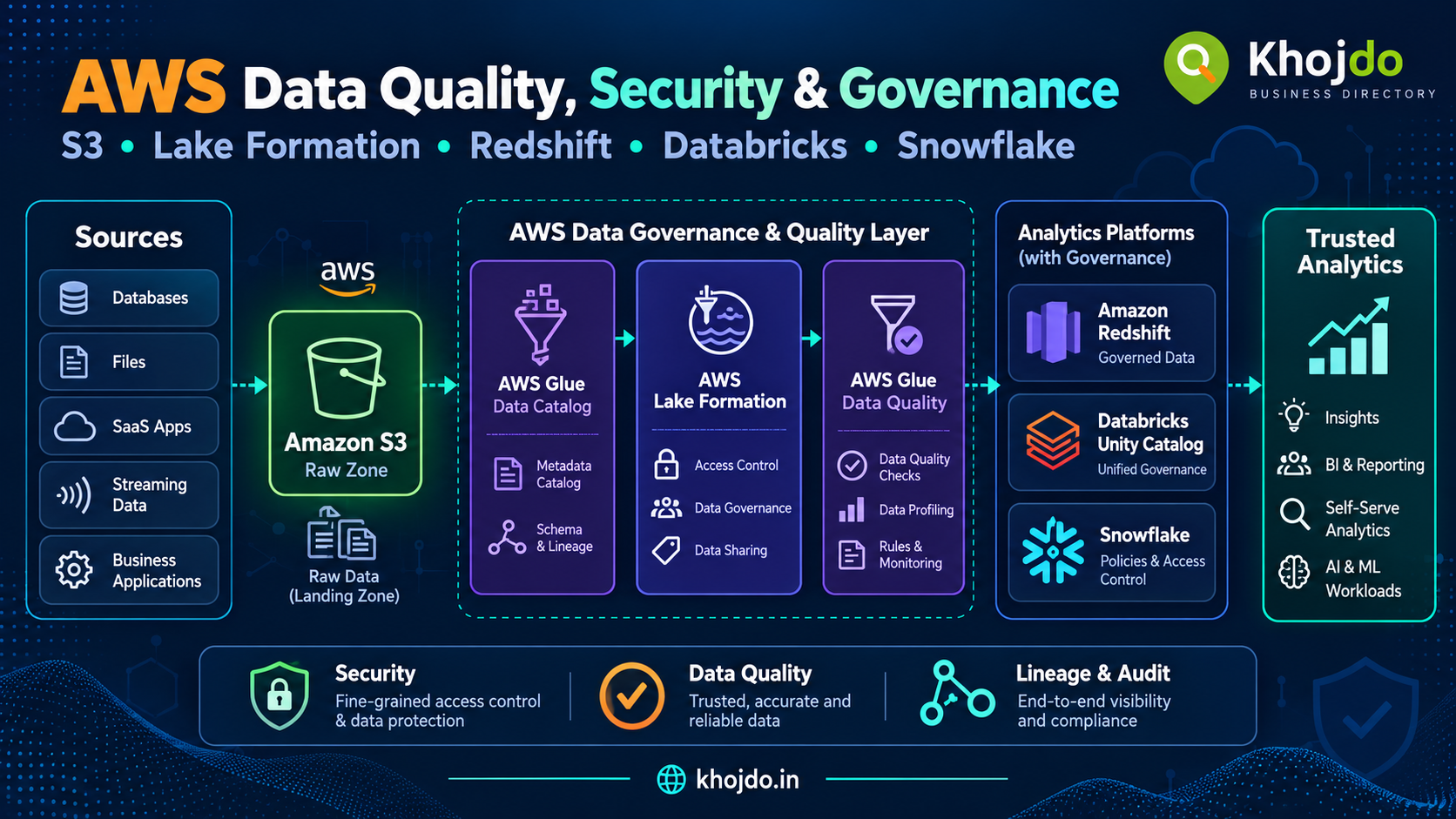
A practical AWS-centered guide to data quality, security and governance across S3, Glue, Lake Formation, Redshift, Databricks and Snowflake, with a customer-data example, service roles, common risks and implementation steps.
Data quality, security and governance work best when they are built into the data flow. For an AWS-centered platform, this means checking data as it arrives, controlling who can access it, recording how it changes, and making data owners accountable for its meaning and retention.
Example: protecting customer and order data
Imagine an online retailer ingesting customer, order and payment data from applications and SaaS tools. The platform lands source files in Amazon S3, catalogs them, validates required fields, and publishes approved data to analytics. Analysts can report on order trends, while only authorized support or finance users can see sensitive customer details.
For example, the team can reject or quarantine orders with missing order IDs, mask phone numbers for most analysts, restrict each regional team to its own region, and preserve access logs for investigation. The controls must be applied in every system where the data is copied or queried.
AWS services for quality and governance
- Amazon S3: Stores source and curated data; supports encryption, access controls, versioning, inventory and lifecycle policies.
- AWS Glue Data Catalog: Stores table and schema metadata so analytics tools can discover datasets consistently.
- AWS Glue Data Quality: Evaluates rules such as completeness, uniqueness and valid ranges, then reports quality outcomes.
- AWS Lake Formation: Centralizes fine-grained permissions for cataloged data lake tables and underlying S3 data.
- AWS IAM: Controls which users and service roles can call AWS services and access resources.
- AWS KMS: Manages encryption keys used to protect data at rest.
- Amazon Macie: Helps discover sensitive data, including potential personally identifiable information, in S3.
- AWS CloudTrail: Records account and service API activity for auditing and investigation.
- AWS Config: Evaluates resource configurations against desired rules and records configuration changes.
- Amazon CloudWatch: Collects metrics, logs and alarms for pipeline health and security operations.
Amazon S3: protect and govern the data foundation
Organize S3 data into clearly owned zones, such as raw, refined and curated. Keep raw data access narrow because it may contain unvalidated or sensitive fields. Use separate roles for ingestion, transformation and consumption, and grant only the access each role needs. Require encrypted connections and configure encryption at rest using an approved key strategy.
Use Lake Formation with the Glue Data Catalog when teams need catalog-level and fine-grained access to lake data. IAM permissions still control access to AWS APIs and resources; Lake Formation grants govern access to supported catalog data. Test both permission layers together, since a grant in one layer does not automatically compensate for a missing permission in the other.
Use S3 Inventory, CloudTrail and appropriate access logs to review bucket and object activity. Macie can help identify sensitive data that was placed in an unexpected bucket or prefix. Tag data with its owner, sensitivity, domain and retention class so policies and reviews can be applied consistently.
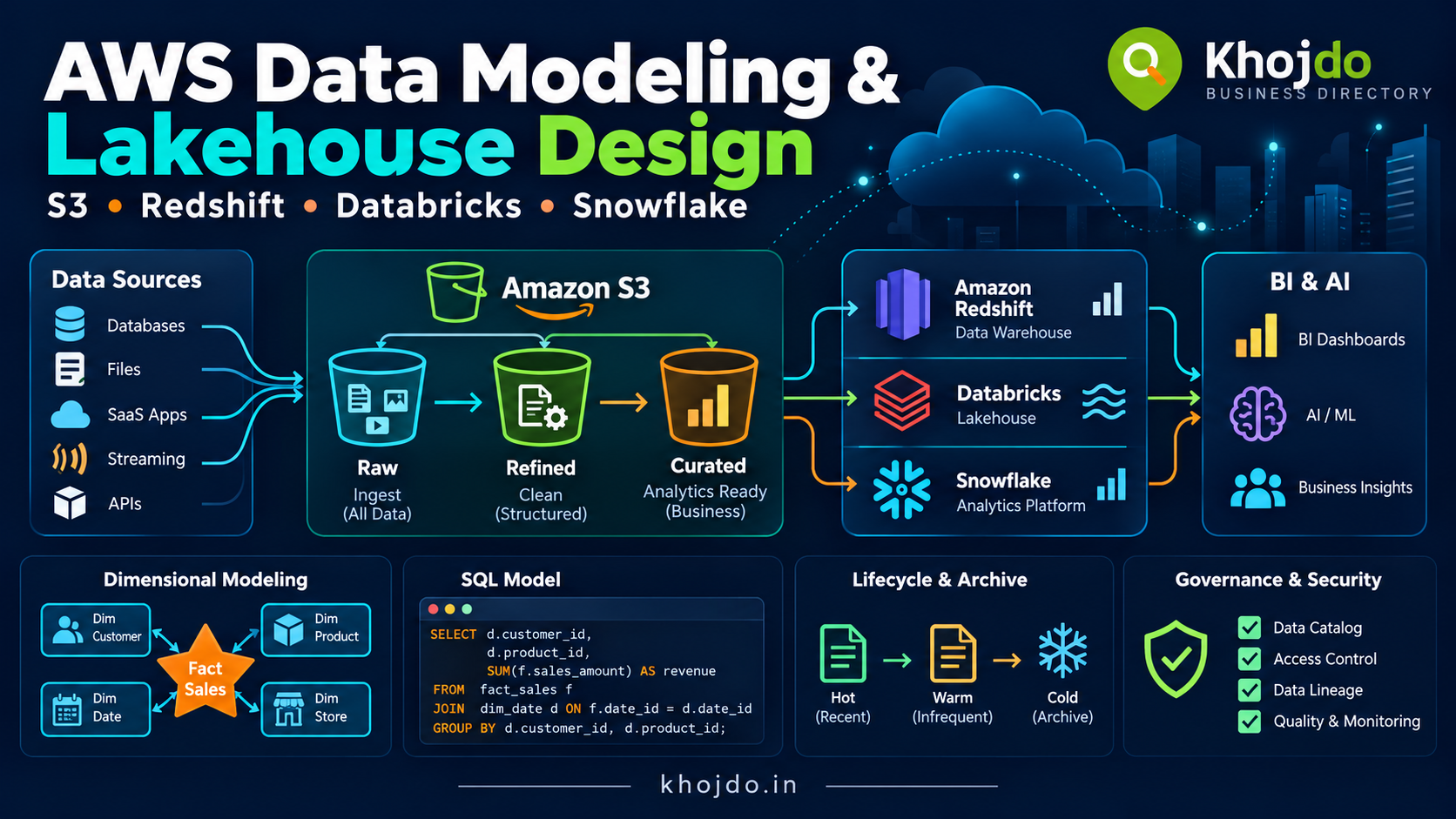
S3 lifecycle planning: Lifecycle rules can transition or expire objects selected by prefix, tags or other supported filters. Define retention with data owners and compliance teams; check restore time and retrieval charges before archiving data; and test rules carefully. In versioned buckets, current and noncurrent versions need separate consideration. Expiring a current version may leave prior versions stored, so lifecycle policies should cover both when appropriate.
Quality checks: prevent bad data from becoming trusted data
Define quality rules with business owners, then run them at ingestion and at important transformation boundaries. For the retailer example, rules might require a non-null order ID, unique source event ID, positive quantity, valid currency code, and an order date within an expected range.
AWS Glue Data Quality uses Data Quality Definition Language (DQDL) to express rules. For example, a ruleset could assert that order_id is complete and unique. A failed check should have an agreed outcome: stop publication, quarantine affected rows, or publish with an explicit warning if the business accepts the risk. Record the failed rule, affected source batch and remediation owner.
Do not equate a job finishing successfully with data being correct. Track completeness, freshness, duplicates, invalid records, referential integrity and reconciliation totals. Compare source and target counts or financial totals where suitable, and maintain a correction and replay process.
Amazon Redshift: warehouse security and quality
Redshift is useful for governed SQL analytics and BI workloads. Use database roles and least-privilege grants to separate loading, transformation, analyst and administration responsibilities. Where appropriate, apply row-level security to restrict records and dynamic data masking or column-level controls to limit sensitive values.
For the retailer example, an analyst role might see all order totals but only rows for its assigned region; phone numbers may be masked for general reporting. Keep policies simple, test with representative user roles, and verify query behavior after policy changes. Include security policies in SQL deployment reviews and audit who can alter them.
Quality checks can run before or after data loads. Validate schema, required fields and reconciliation totals before marking a reporting table as certified. Monitor failed loads, unexpected row-count changes, query access and sensitive table usage.
Databricks: governance across lakehouse data
Databricks on AWS commonly uses Unity Catalog to govern data and other assets across workspaces. Use catalogs and schemas to organize by domain and environment, grant privileges to groups rather than individual users, and apply policies consistently to tables and views. Unity Catalog can also capture lineage for supported queries, helping teams trace data from source to downstream tables and reports.
For example, maintain restricted customer attributes in a controlled schema and publish a separate analytics table with approved or masked fields. Add validation to ingestion and transformation jobs, and quarantine rows that fail contract checks. Use lineage and audit information to investigate unexpected report values or assess the impact of a schema change.
Databricks permissions do not automatically become Lake Formation, Redshift or Snowflake permissions. Define how access is managed across platforms, and reapply the appropriate controls wherever data is copied or shared.
Snowflake: role-based access, masking and row policies
Snowflake uses roles and grants to control access to databases, schemas, tables and other objects. For sensitive analytics, masking policies can change what a user sees in a protected column at query time, while row access policies can restrict which rows are returned.
For example, a general analyst role could see only the last four digits of a phone number, while an approved support role can see the full value for a documented business purpose. A regional access policy can restrict order rows according to the user’s assigned region. Keep policy ownership separate from ordinary table ownership where practical, and test policies with role hierarchies and actual reporting tools.
Snowflake’s policies are platform-specific. When data moves from S3 or another platform into Snowflake, establish and test equivalent role, masking and row-access controls in Snowflake rather than assuming upstream controls still apply.
Key challenges, mitigation and best practices
- Permissions are too broad: Use role-based access, groups, least privilege and periodic access reviews. Separate administrator, data owner, engineer and analyst responsibilities.
- Controls differ across copies: Maintain a data-flow inventory and map controls to each destination. Test permissions independently in S3, Lake Formation, Redshift, Databricks and Snowflake.
- Sensitive fields are undiscovered: Classify data at ingestion, use Macie to help find sensitive S3 content, and require data owners to approve new fields and destinations.
- Quality rules are missing or overly strict: Agree on thresholds with business owners, track trends, and route exceptions to quarantine with clear ownership and recovery steps.
- Schema changes break consumers: Version data contracts, test downstream models, communicate breaking changes and use a deprecation window.
- Audit trails are incomplete: Enable appropriate CloudTrail and service logs, protect log access, set retention, and periodically verify that important events are captured.
- Policies reduce performance or usability: Keep predicates and masking expressions simple, measure query impact, and provide approved curated views for common analysis.
- Lifecycle rules remove needed data: Confirm retention and restore requirements, test filters, cover noncurrent versions where needed, and review lifecycle effects after policy changes.
- Ownership is unclear: Assign a named business owner, technical custodian and quality contact for each critical data product.
Implementation plan
- Inventory data sources, destinations, owners, sensitive fields, consumers and retention obligations.
- Classify datasets and agree on access groups, quality expectations and approved use cases.
- Secure S3 buckets and keys; set up the Glue Data Catalog and Lake Formation permissions where lake access requires them.
- Define quality rules at ingestion and transformation boundaries, with quarantine and replay paths.
- Configure Redshift, Databricks and Snowflake roles and policies for their own users and data copies.
- Enable audit, lineage, monitoring and alerting for important access and pipeline events.
- Test with real roles and representative records, including denied access, masked values, bad data and schema changes.
- Review permissions, quality trends, retention rules and incident runbooks on a regular schedule.
Trustworthy data depends on clear ownership and controls that follow the data. Start with the risks and business uses, validate data at meaningful boundaries, and verify access in every service that stores or serves it.